




Christmas wishes
By fernandfj
· 492 views
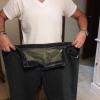
So, it's Christmas eve. AT this time of year, I send more time reviewing what happened over the past twelve months. It's been an incredible journey for me, going from really being depressed about my state of health to beyond hopeful after dropping over 100 lbs. No present is better than what I have given myself with the surgery and the work afterwards - a brighter, healthier future. I;m very happy and thankful for that. I also seem to be getting over the testosterone rage from all the testosterone flooding my system after the fat loss. The past few weeks I have calmed down,and I thank God my wife had the patience to ride out this storm with me. Now I look forward to what will come in 2016 and beyond. I will look at my family this Christmas and be thankful that I will be around longer to enjoy them. What a great gift!
I wish everyone a wonderful holiday season and a bright and joyous, and much lighter, 2016!
Recommended Comments