




Skip to content
View in the app

A better way to browse. Learn more.

BariatricPal

A full-screen app on your home screen with push notifications, badges and more.

To install this app on iOS and iPadOS
  1. Tap the Share icon in Safari
  2. Scroll the menu and tap Add to Home Screen.
  3. Tap Add in the top-right corner.
To install this app on Android
  1. Tap the 3-dot menu (⋮) in the top-right corner of the browser.
  2. Tap Add to Home screen or Install app.
  3. Confirm by tapping Install.

Didn't recognize my own reflection, nice!
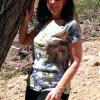
We're in a new office building & have see-through windows in conference rooms, with the exception of a frosted window strip going through the middle of the window walls so you can't see the people when they're sitting down around the table.


So, I'm walking down the hall, passing one of the conference rooms & check out the reflection of a thin figure going by. I actually stopped myself in my own tracks realizing, "Holy shi*, that's ME!!!!!!!!!!!"


I don't mean to sound conceited in any way, shape or form, but I actually looked nice. I can't believe I didn't even recognize my own reflection.


It's taken me 1 1/2 years to get here, but guess what, I AM FINALLY HERE!!!

2 Comments

Recommended Comments

Scylla

Gastric Sleeve Patients

That is beyond awesome! Congratulations!!!

rhodywoman

Gastric Bypass Patients

You have inspired me in so many ways right now! What a wonderful feeling. Congratulations!

Guest
Add a comment...

Account

Navigation

Search

Search

Configure browser push notifications

Chrome (Android)
  1. Tap the lock icon next to the address bar.
  2. Tap Permissions → Notifications.
  3. Adjust your preference.
Chrome (Desktop)
  1. Click the padlock icon in the address bar.
  2. Select Site settings.
  3. Find Notifications and adjust your preference.