




Skip to content
View in the app

A better way to browse. Learn more.

BariatricPal

A full-screen app on your home screen with push notifications, badges and more.

To install this app on iOS and iPadOS
  1. Tap the Share icon in Safari
  2. Scroll the menu and tap Add to Home Screen.
  3. Tap Add in the top-right corner.
To install this app on Android
  1. Tap the 3-dot menu (⋮) in the top-right corner of the browser.
  2. Tap Add to Home screen or Install app.
  3. Confirm by tapping Install.

Hello Everyone

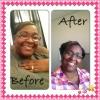
Hey Everyone, I have not been on in a while and just wanted to see how everyone else was doing! I have lost 50 pounds thus far and I will 3 months post-op tomorrow...Feeling good but still a work in progress. I am working hard. Next week I will be starting a couch to half marathon and looking forward to this! Well I want to wish everyone good luck on their journey!!!

2 Comments

Recommended Comments

GoldyGirl

Pre Op

Congrats, what is the "couch to half marathon"? is it a running Program?

Kathy Jo

Gastric Sleeve Patients

Good for you! Sounds like you are doing great!!

Guest
Add a comment...

Account

Navigation

Search

Search

Configure browser push notifications

Chrome (Android)
  1. Tap the lock icon next to the address bar.
  2. Tap Permissions → Notifications.
  3. Adjust your preference.
Chrome (Desktop)
  1. Click the padlock icon in the address bar.
  2. Select Site settings.
  3. Find Notifications and adjust your preference.