




By Lauracat
· 688 views
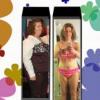
Yes It here finaly the date all my freinds and family and support pepole are comming both of the trainers i worked with and all my freinds from the gym. I got my cute outfit in hot pink ready to dance in and my new zumba shoes given to me as a gift from penny who is hosting my party. All my freinds have told me that i going to love all my new cloths they got me. I can't wait It finaly a day to cellbrate me that i am front and center and all i done since lap band. It my day.
So meny times in life we put other frist. I always do but now it time for me to cellbrate being a onester. I getting ready to shake I have my music picked out the dance ready to go It all about me and me being the star and doing somthing i used to not do but now love.
One of the gifts given to me was a rainbow collored barclet. This was the card were this and rember to uses all these things in one day you have a succful day
Black - Activty
Red- Love ( tell my family i love them)
Yellow - Happness (doing things that make me happy)\
Green- Apprate nautre - ( i do this when i walk my dog or just by having flower in my house)
blue- Iner Peace ( not to beat my self up over everything)
Puple - self decovery Learning something new
Black - Nurtrion
Recommended Comments