




Skip to content
View in the app

A better way to browse. Learn more.

BariatricPal

A full-screen app on your home screen with push notifications, badges and more.

To install this app on iOS and iPadOS
  1. Tap the Share icon in Safari
  2. Scroll the menu and tap Add to Home Screen.
  3. Tap Add in the top-right corner.
To install this app on Android
  1. Tap the 3-dot menu (⋮) in the top-right corner of the browser.
  2. Tap Add to Home screen or Install app.
  3. Confirm by tapping Install.
  • Appearance

A Oneserst Party

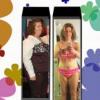
for every body who ever been over 200 lbs you know what it feels like when you brake the mark and for the fritst time see the big 1 on the scale. Well it happend to me when i was so sick i did not even care. But now that i am feeling alot better i want to do something to cellbrate as this is huge!!!!!!! I gone from a 24 to a 14 I goe form a 44 dobble d to a 40 d or a 38 depending on the bar. ,


So i was told to cellbrate millsotones along the way. At 20 lbs i got a pair of shoes at 30 lbs i got some cloths becuse mine were falling off at 35 i did a mani pettti and now were ready for the big one 45 the oneseter land. I want to thow a party but how dose some one party with out food.


Well after talking it over today with my Zumba teacher we came up with the Idea a zumba party yes no food but plenty of zumba and just a good time. I don't have a date yet as I have to wrok it out but I think this is a great way to cellbrate onester land.

3 Comments

Recommended Comments

jennifer1

LAP-BAND Patients

congrats i too finally hit onederland and was sick when it happened. great way to celebrate!

goal_will_be_met

LAP-BAND Patients

Congrats! girl and Good for you on celebrating. What a Fantastic Idea on having a Zumba party! Hope you have a blast!!!

sissy12

LAP-BAND Patients

Go you!

That's awesome, and what a great way to celebrate!

Guest
Add a comment...

Account

Navigation

Search

Search

Configure browser push notifications

Chrome (Android)
  1. Tap the lock icon next to the address bar.
  2. Tap Permissions → Notifications.
  3. Adjust your preference.
Chrome (Desktop)
  1. Click the padlock icon in the address bar.
  2. Select Site settings.
  3. Find Notifications and adjust your preference.