




Skip to content
View in the app

A better way to browse. Learn more.

BariatricPal

A full-screen app on your home screen with push notifications, badges and more.

To install this app on iOS and iPadOS
  1. Tap the Share icon in Safari
  2. Scroll the menu and tap Add to Home Screen.
  3. Tap Add in the top-right corner.
To install this app on Android
  1. Tap the 3-dot menu (⋮) in the top-right corner of the browser.
  2. Tap Add to Home screen or Install app.
  3. Confirm by tapping Install.
  • Appearance

Playing The Waiting Game...
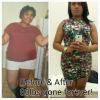
Alright, so who has done everyrthing that they needed to do in order to get the surgery, and are just waiting on that pesky approval...THIS GIRL RIGHT HERE!!!

I have Kaiser Permanente and there is 6 months worth of nutritionist appointments, information sessions, and weight loss classes, and now I have to wait on my approval. I'm so nervous but excited at the same time, and I'm not even sure that I am getting approved...Although I'm pretty sure that I'm getting approved.

Think positive thoughts Janelle. Good Luck to anyone that is in the same boat!

2 Comments

Recommended Comments

KristyT

LAP-BAND Patients

i had to do 6 months supervised dr visits and i ended up losing 18 lbs before my surgery then another 5 with 1 week pre op diet. so it is worth the waith, be patient and think, it could always be worse, keep your head up. good luck

PattyGirl66

LAP-BAND Patients

<---- waiting

Patiently I might add, I know I shouldn't rush it because there is still many things I need to do before hand, but the waiting really bites! I have 3 more months and have done everything. Just purchasing and preparing myself, I guess that is all we can do for now.

Thank goodness I found this site to read and write. I have learned so much here from all you nice people :)

Guest
Add a comment...

Account

Navigation

Search

Search

Configure browser push notifications

Chrome (Android)
  1. Tap the lock icon next to the address bar.
  2. Tap Permissions → Notifications.
  3. Adjust your preference.
Chrome (Desktop)
  1. Click the padlock icon in the address bar.
  2. Select Site settings.
  3. Find Notifications and adjust your preference.