




Skip to content
View in the app

A better way to browse. Learn more.

BariatricPal

A full-screen app on your home screen with push notifications, badges and more.

To install this app on iOS and iPadOS
  1. Tap the Share icon in Safari
  2. Scroll the menu and tap Add to Home Screen.
  3. Tap Add in the top-right corner.
To install this app on Android
  1. Tap the 3-dot menu (⋮) in the top-right corner of the browser.
  2. Tap Add to Home screen or Install app.
  3. Confirm by tapping Install.

Bought a bike!

I've been thinking about buying a bike for awhile now. I got some great advice from other LBTers. So, I went out and bought my new bike today. The salesdude let me take it for a spin around the parking lot. I was grinning like an idiot. I forgot how much fun it was. If anyone in the Dallas area wants a new bike, I highly recommend B&B Bicycles. Those guys are awesome! Here are some pics. of my new exercise "toy."

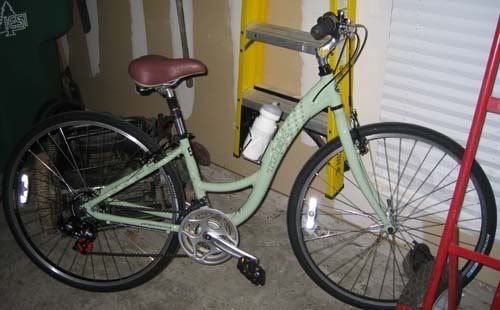
 

Bike2-small.jpg


Bike1-small.jpg


I'm going for my 2nd fill tomorrow. I am so very much looking forward to getting some real restriction. I need my scale to start moving in the right direction, before I lose my mind.

1 Comment

Recommended Comments

kutia

LAP-BAND Patients

I've been thinking about buying a bike for awhile now. I got some great advice from other LBTers. So, I went out and bought my new bike today. The salesdude let me take it for a spin around the parking lot. I was grinning like an idiot. I forgot how much fun it was. If anyone in the Dallas area wants a new bike, I highly recommend B&B Bicycles. Those guys are awesome! Here are some pics. of my new exercise "toy."

Bike2-small.jpg

Bike1-small.jpg

I'm going for my 2nd fill tomorrow. I am so very much looking forward to getting some real restriction. I need my scale to start moving in the right direction, before I lose my mind.

Guest
Add a comment...

Account

Navigation

Search

Search

Configure browser push notifications

Chrome (Android)
  1. Tap the lock icon next to the address bar.
  2. Tap Permissions → Notifications.
  3. Adjust your preference.
Chrome (Desktop)
  1. Click the padlock icon in the address bar.
  2. Select Site settings.
  3. Find Notifications and adjust your preference.