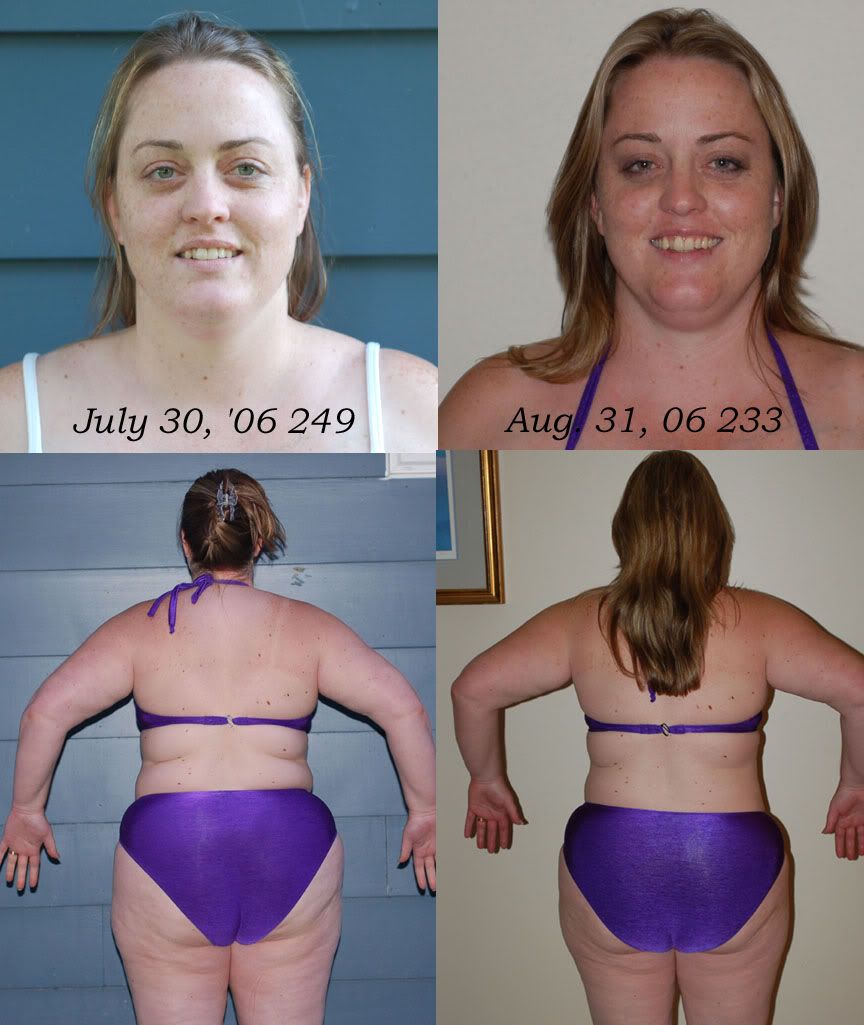
One Month Later Pictures Share https://www.bariatricpal.com/blogs/entry/1619-one-month-later-pictures/ Share via email Share on Facebook Share on X Share on Reddit More sharing options... Followers Just over 2 weeks after surgery and one month since the original photos were taken...
LittleBird LAP-BAND Patients September 2, 200620 yr Author stats Just over 2 weeks after surgery and one month since the original photos were taken...
faybie LAP-BAND Patients September 2, 200620 yr Author stats Wow. Look at the definition around your eyes and your more shapely chin. You are looking great! You go girl!
Telly LAP-BAND Patients September 2, 200620 yr Author stats You are doing a great job. Keep going and never look back.
Guest MoOrLess Guests September 4, 200620 yr Wow girl - I just am looking now -- you look wonderful, that chin of yours! and your neck wow - and your bathing suit fits SO different - amazing in such a short time - imagine this time next year! woo hoo! congrats girl keep up the good work!





Recommended Comments