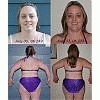
Sharing my firelight pic Share https://www.bariatricpal.com/blogs/entry/1495-sharing-my-firelight-pic/ Share via email Share on Facebook Share on X Share on Reddit More sharing options... Followers Before surgery my friend came over and we took some pics by the fire. This is my favorite and I thought I would share! I couldn't post it before the trip!
LittleBird LAP-BAND Patients August 20, 200620 yr Author stats Before surgery my friend came over and we took some pics by the fire. This is my favorite and I thought I would share! I couldn't post it before the trip!
Bettina LAP-BAND Patients August 21, 200620 yr Author stats You are very pretty....this picture is gorgeous!!!!!!! You say your friend took this?? Way better than glamour shots!!!!!! Tell her she is a great photographer!!
Guest MoOrLess Guests August 21, 200620 yr What a beauty you are! and now the band too? OMG look out world here comes another georgous lady! Congrats on surgery - hope all is going well for you, I'm truly excited for you!
LittleBird LAP-BAND Patients August 21, 200620 yr Author stats She is a great photographer - she has been doing it for over 20 years! the best part is she is free for me! *wink* thank you for the compliments.
Bjornsyouruncle LAP-BAND Patients May 29, 200818 yr Author stats That's such a pretty picture! What a neat idea to use firelight.






Recommended Comments