Skip to content
View in the app

A better way to browse. Learn more.

BariatricPal

A full-screen app on your home screen with push notifications, badges and more.

To install this app on iOS and iPadOS
  1. Tap the Share icon in Safari
  2. Scroll the menu and tap Add to Home Screen.
  3. Tap Add in the top-right corner.
To install this app on Android
  1. Tap the 3-dot menu (⋮) in the top-right corner of the browser.
  2. Tap Add to Home screen or Install app.
  3. Confirm by tapping Install.

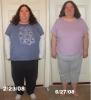
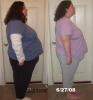
My four month progess pics

Here are my four month pics, taken tonight.

post-230861-13813137242546_thumb.jpg

post-230861-1381313724285_thumb.jpg

  • Replies 9
  • Views 928
  • Created
  • Last Reply

Top Posters In This Topic

Posted Images

Featured Replies

You're doing so well!! Lookin good!

You're looking good Jamie, hope my results are as good as yours on my4 month mark. Where were you banded, I was banded at DuPaul hospital?

Jaime, you're looking great. Feels so good when you can see a difference doesn't it? Congrats! I can't wait to see all of us at our 6 month and 1 year. Wow, they won't even know who we are.

  • Author
You're looking good Jamie, hope my results are as good as yours on my4 month mark. Where were you banded, I was banded at DuPaul hospital?

I was banded at Des Peres.

Jaime, congratulations, you are looking good! :tt2: The difference in your second picture really shows all the hard work you've done. Way to go! I love your smile in that second picture too! :lol:

And I just had to notice the top you are wearing in your first picture . . . the blue one with white sleeves and butterflies. I have that same top, I wore it last winter before my lap-band surgery! We've been shopping in the same stores sweetie :)

Looking good chica!! Is amazing the changes that you see outside of just the physical. Like how much more room you have in the car or how much easier it is to get through a turn style. KEEP IT GOING SLIM!!

Join the conversation

You can post now and register later. If you have an account, sign in now to post with your account.

Guest
Reply to this topic...

Account

Navigation

Search

Search

Configure browser push notifications

Chrome (Android)
  1. Tap the lock icon next to the address bar.
  2. Tap Permissions → Notifications.
  3. Adjust your preference.
Chrome (Desktop)
  1. Click the padlock icon in the address bar.
  2. Select Site settings.
  3. Find Notifications and adjust your preference.