Skip to content
View in the app

A better way to browse. Learn more.

BariatricPal

A full-screen app on your home screen with push notifications, badges and more.

To install this app on iOS and iPadOS
  1. Tap the Share icon in Safari
  2. Scroll the menu and tap Add to Home Screen.
  3. Tap Add in the top-right corner.
To install this app on Android
  1. Tap the 3-dot menu (⋮) in the top-right corner of the browser.
  2. Tap Add to Home screen or Install app.
  3. Confirm by tapping Install.
  • Appearance

Join BariatricPal free

  • Ask your own questions
  • Reply and follow topics
  • Message other members
  • No cost, no spam

How to get started in this Forum

I expected to find a pinned post at the very top, explaining to newbies how to set up their profile and signature, but after two hours of searching, I give up! Are there instructions somewhere?

  • Replies 7
  • Views 1.8k
  • Created
  • Last Reply

Top Posters In This Topic

Most Popular Posts

  • Verrry interesting. That whole section (see attached screenshot) just appeared between when I posted and right now when I logged in again to see your message. It simply wasn't there until now. Perhaps

Posted Images

Featured Replies

If you're on the website, look at the top of the page for your profile name. Click on it. All the things you might want to update or change should be in one of the options that show up. Probably the most important one is labeled "My Surgery". This page has multiple tabs on the left-hand side. Different info is found on each tab. You may want to go through all of them to find the various items you're looking for such as weights, surgery dates, etc.

  • Author

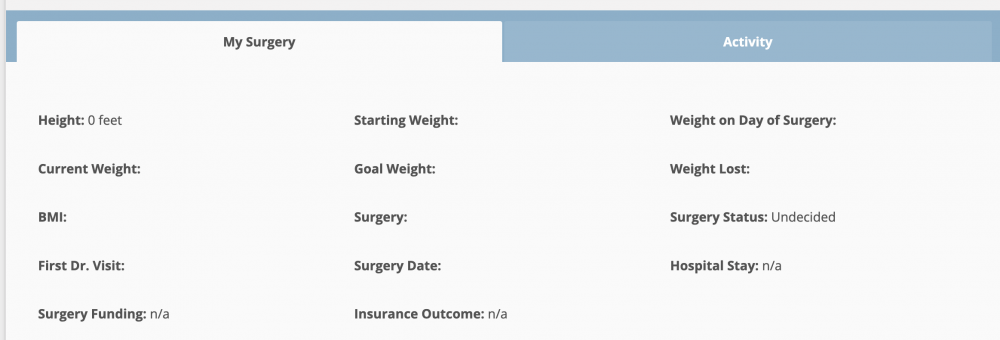
SpartanMaker, I click on my photo at the top of this page and in my profile is a "My Surgery" section, but there are no tabs within "My Surgery." There are areas to enter lots of surgery-related data (height, current weight, BMI, etc.), but when I try to type something, there's just no space to type into. I don't understand how practically everyone else participating in this Forum has been able to do it, and I can't! Here's a screenshot of how it presents to me. Notice there is no edit button or anything to click on.

750199680_mysurg.thumb.png.d0b39066d830053095d4789a3d009f7e.png

Edited by SacB

There's a little upside down triangle next to your profile name at the top of the page. You click on the upside down triangle and under the settings section you'll see 'My Surgery' which you input all your surgery details. 'My Tickers' is also found under the upside down triangle following your profile name under settings and that's where you add the signature.

  • Author
15 minutes ago, NovaLuna said:

"There's a little upside down triangle next to your profile name at the top of the page. You click on the upside down triangle..."

Verrry interesting. That whole section (see attached screenshot) just appeared between when I posted and right now when I logged in again to see your message. It simply wasn't there until now. Perhaps that's how it happens when someone is newly-registered to the website. I've filled in the little information I have so far, as I'm at the very beginning of this journey. Thanks to all who reached out and helped me complete my profile to date. It will help other newbies, I'm sure.

profile.png

  • Author
7 minutes ago, BrandiAnne said:

There is nowhere that my name even shows up except where I've posted. And clicking on my picture there brings me nowhere.

Hi BrandiAnne, You're in the exact same spot I was in when I first posted this issue. What got me on my way to the solution was to click on "Report post" right here in the Forum. The post I chose to report was my most recent one. And when I had to write something as to why I reported it, I wrote something like, "Is there a moderator here who can tell me why I can't edit the 'My Surgery' section of my profile? Why am I the only one who seems unable to do this? Can you fix this issue?" It was shortly after that someone in charge must have been able to fix the issue, because all of a sudden I was able to see the little upside-down triangle (see my screenshot in my very last post) right next to my screen-name. And once I was able to have that available I could complete my profile. I really hope this can help you too! Good luck.

Join the conversation

You can post as a guest; create a free account to track replies, follow topics, and be part of the largest weight loss surgery community.

Join the conversation

You can post now and register later. If you have an account, sign in now to post with your account.

Guest
Reply to this topic...

Account

Navigation

Search

Search

Configure browser push notifications

Chrome (Android)
  1. Tap the lock icon next to the address bar.
  2. Tap Permissions → Notifications.
  3. Adjust your preference.
Chrome (Desktop)
  1. Click the padlock icon in the address bar.
  2. Select Site settings.
  3. Find Notifications and adjust your preference.