Skip to content
View in the app

A better way to browse. Learn more.

BariatricPal

A full-screen app on your home screen with push notifications, badges and more.

To install this app on iOS and iPadOS
  1. Tap the Share icon in Safari
  2. Scroll the menu and tap Add to Home Screen.
  3. Tap Add in the top-right corner.
To install this app on Android
  1. Tap the 3-dot menu (⋮) in the top-right corner of the browser.
  2. Tap Add to Home screen or Install app.
  3. Confirm by tapping Install.
  • Appearance

Join BariatricPal free

  • Ask your own questions
  • Reply and follow topics
  • Message other members
  • No cost, no spam

How do you find a covered surgeon?

I am working on trying to find a bariatric surgeon in my area (Pittsburgh, PA) who is considered In-Network for my insurnace (Aetna), and having a little bit of a hard time. I don't know what exactly to search for on my Aetna member portal that will provide me with a list of In-Network bariatric surgeons, and so far doing a google search for local bariatric surgeons, finding the names and then searching for them in my Aetna member portal, isn't providing me with much of anything.

Is there an easier way to do this? What am I doing wrong? Or is it just that there are no In-Network bariatric surgeons near me?

TIA for any help..

  • Replies 6
  • Views 2k
  • Created
  • Last Reply

Top Posters In This Topic

Most Popular Posts

  • sassfordays
    sassfordays

    Well thank you to both of you who responded. You gave me really good information. I'm not sure why when I log on the Aetna website, and search any of the surgeons associated with these hospitals, none

  • Suzi_the_Q
    Suzi_the_Q

    I found these: http://www.aetna.com/cpb/medical/data/100_199/0157.html https://www.castleconnolly.com/top-doctors/giselle-g-hamad-surgery-81cc043162 https://www.excelahealth.org/Service

Posted Images

Featured Replies

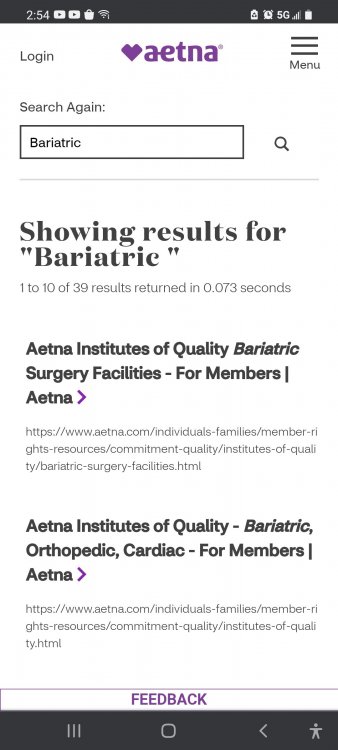
Screenshot_20210411-145435_Chrome.jpg

  • Author

Screenshot_20210411-145435_Chrome.thumb.jpg.d3d7cfc9f28be3af5b8f162b67fe614e.jpg

That provides information about the Aetna quality providers etc, but I don't see where it leads to physician names.
  • Author

Well thank you to both of you who responded. You gave me really good information. I'm not sure why when I log on the Aetna website, and search any of the surgeons associated with these hospitals, none of them come up, but this gives me a direction to go. Thank you for holding my hand like a child lol I don't know how I was missing all of this

I tried the Aetna website too and it was awful, but it did mention that they required an "Aetna Center for Excellence" cert, so I googled "Aetna + Pittsburgh, PA + Bariatric" and looked for those centers, since obv. they'd take Aetna insurance.

Edited by Suzi_the_Q

  • Author
23 hours ago, Suzi_the_Q said:

I tried the Aetna website too and it was awful, but it did mention that they required an "Aetna Center for Excellence" cert, so I googled "Aetna + Pittsburgh, PA + Bariatric" and looked for those centers, since obv. they'd take Aetna insurance.

Well, I know that sometimes with insurance, a specific doctor may be "in network" but that doesn't mean that each hospital they have privileges with is in network, and I know that some hospitals may be in-network but that doesn't mean every doctor at that hospital is considered in-network, so I was trying to use their provider search to find an actual surgeon who was listed as in-network, just to try to make sure I had all my bases covered, and get myself set up for success as much as possible. I suppose I was just making it more difficult for myself.

Thank you. :)

Join the conversation

You can post as a guest; create a free account to track replies, follow topics, and be part of the largest weight loss surgery community.

Join the conversation

You can post now and register later. If you have an account, sign in now to post with your account.

Guest
Reply to this topic...

Account

Navigation

Search

Search

Configure browser push notifications

Chrome (Android)
  1. Tap the lock icon next to the address bar.
  2. Tap Permissions → Notifications.
  3. Adjust your preference.
Chrome (Desktop)
  1. Click the padlock icon in the address bar.
  2. Select Site settings.
  3. Find Notifications and adjust your preference.