Skip to content
View in the app

A better way to browse. Learn more.

BariatricPal

A full-screen app on your home screen with push notifications, badges and more.

To install this app on iOS and iPadOS
  1. Tap the Share icon in Safari
  2. Scroll the menu and tap Add to Home Screen.
  3. Tap Add in the top-right corner.
To install this app on Android
  1. Tap the 3-dot menu (⋮) in the top-right corner of the browser.
  2. Tap Add to Home screen or Install app.
  3. Confirm by tapping Install.
  • Appearance

Join BariatricPal free

  • Ask your own questions
  • Reply and follow topics
  • Message other members
  • No cost, no spam

Pill box

Seems like a dummy question. Haha. But I have used a 7d vitamin holder am/pm and seems to work for my regular meds.

Being revised next week, and just ordered a bunch of Bariatric chews etc. I would like to keep everything together so I’m prepped when I get home. a regular box won’t keep a few chews and fit it properly. Maybe ziplock type item.

thanks.

  • Replies 7
  • Views 2.1k
  • Created
  • Last Reply

Top Posters In This Topic

Most Popular Posts

  • Hill_Billy
    Hill_Billy

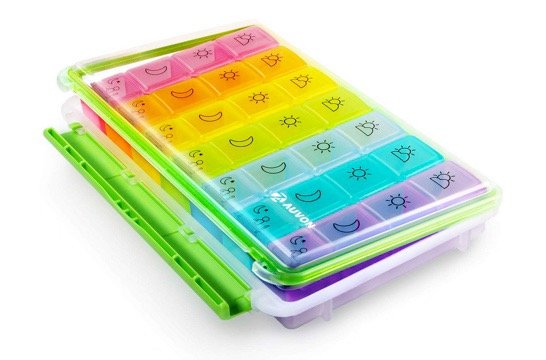
    This may seem like overkill but I love this monstrosity: AUVON iMedassist Weekly AM/PM Pill Box, (7-Day / 4-Times-A-Day) with Moisture-Proof Design and Large Compartments to Hold Vitamins, Supple

  • ge0rgette2
    ge0rgette2

    Just ordered that last night lol

Posted Images
Featured Replies

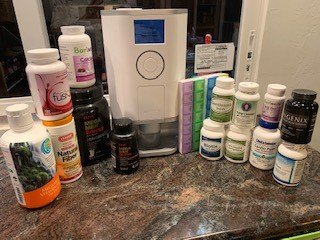
If you can do ii get a Hero! Great Machine has issues some times but they fix it every time

Vitamins.jpg

I always have some calcium chews in a ziplock bag in my purse. The others I keep in their original packaging in my house.

This is the pill box that I use, and I love it. I can take the individual day's pills with me and it holds all the pills I take (duodenal switch here = LOTS of vitamins).

Join the conversation

You can post as a guest; create a free account to track replies, follow topics, and be part of the largest weight loss surgery community.

Join the conversation

You can post now and register later. If you have an account, sign in now to post with your account.

Guest
Reply to this topic...

Account

Navigation

Search

Search

Configure browser push notifications

Chrome (Android)
  1. Tap the lock icon next to the address bar.
  2. Tap Permissions → Notifications.
  3. Adjust your preference.
Chrome (Desktop)
  1. Click the padlock icon in the address bar.
  2. Select Site settings.
  3. Find Notifications and adjust your preference.