Skip to content
View in the app

A better way to browse. Learn more.

BariatricPal

A full-screen app on your home screen with push notifications, badges and more.

To install this app on iOS and iPadOS
  1. Tap the Share icon in Safari
  2. Scroll the menu and tap Add to Home Screen.
  3. Tap Add in the top-right corner.
To install this app on Android
  1. Tap the 3-dot menu (⋮) in the top-right corner of the browser.
  2. Tap Add to Home screen or Install app.
  3. Confirm by tapping Install.
  • Appearance

Join BariatricPal free

  • Ask your own questions
  • Reply and follow topics
  • Message other members
  • No cost, no spam

Almost there

  • Replies 17
  • Views 2.6k
  • Created
  • Last Reply

Top Posters In This Topic

Most Popular Posts

  • Chattanoogagirl
    Chattanoogagirl

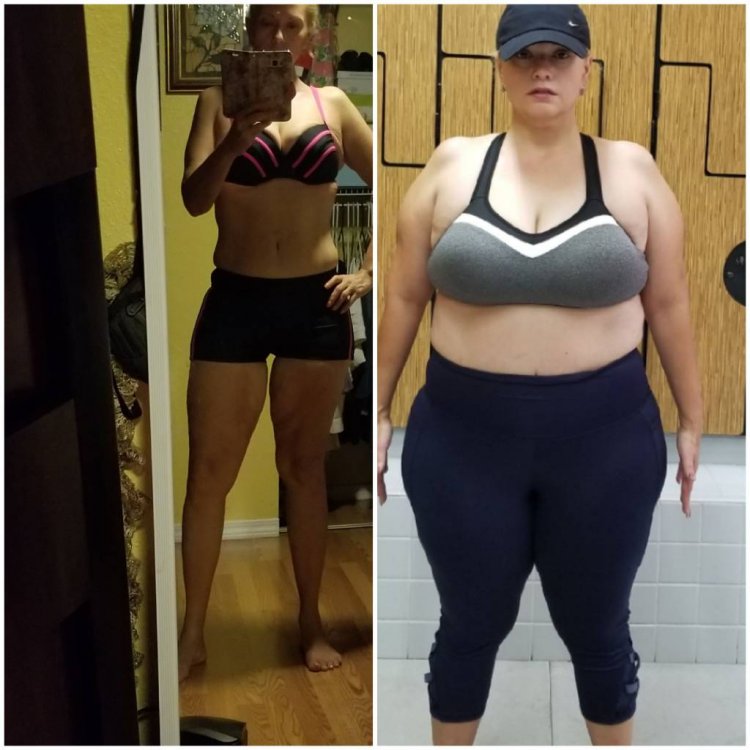
    Wow girl! You look great! Your before pic looks like what I look like now at 171.8 at 5'2 with a BMI of 31.31. My goal weigh is 143.

  • Rays of Sunshine
    Rays of Sunshine

    @lorraine#11 wow girl you look amazing congratulations on your win how inspiring

  • Cheeseburgh
    Cheeseburgh

    No question, you’ve got this! Congratulations, you look amazing!

Posted Images
Featured Replies

On 8/27/2019 at 7:15 PM, Chattanoogagirl said:

I have a question for ya'll! Has anyone done there stock up on drink mixes, powder shakes, ready to drink shakes and Vitamins before their first visit with the surgeon before a date was even set. I hate procrastination, and I like to be prepared.

I found a protein drink I liked. I also got chicken broth but I didn't try vitamins for almost a month and you really won't be drinking a lot for about a month. I drink caffeine-free cold tea and Ensure Max one or two a day. Sugar-free popcycles were a real treat! I like no sugar added Outshine. I bought stuff I'll never drink so I'd just get some basics and shop later.

Join the conversation

You can post as a guest; create a free account to track replies, follow topics, and be part of the largest weight loss surgery community.

Join the conversation

You can post now and register later. If you have an account, sign in now to post with your account.

Guest
Reply to this topic...

Account

Navigation

Search

Search

Configure browser push notifications

Chrome (Android)
  1. Tap the lock icon next to the address bar.
  2. Tap Permissions → Notifications.
  3. Adjust your preference.
Chrome (Desktop)
  1. Click the padlock icon in the address bar.
  2. Select Site settings.
  3. Find Notifications and adjust your preference.