Skip to content
View in the app

A better way to browse. Learn more.

BariatricPal

A full-screen app on your home screen with push notifications, badges and more.

To install this app on iOS and iPadOS
  1. Tap the Share icon in Safari
  2. Scroll the menu and tap Add to Home Screen.
  3. Tap Add in the top-right corner.
To install this app on Android
  1. Tap the 3-dot menu (⋮) in the top-right corner of the browser.
  2. Tap Add to Home screen or Install app.
  3. Confirm by tapping Install.
  • Appearance

Join BariatricPal free

  • Ask your own questions
  • Reply and follow topics
  • Message other members
  • No cost, no spam

App keeps crashing

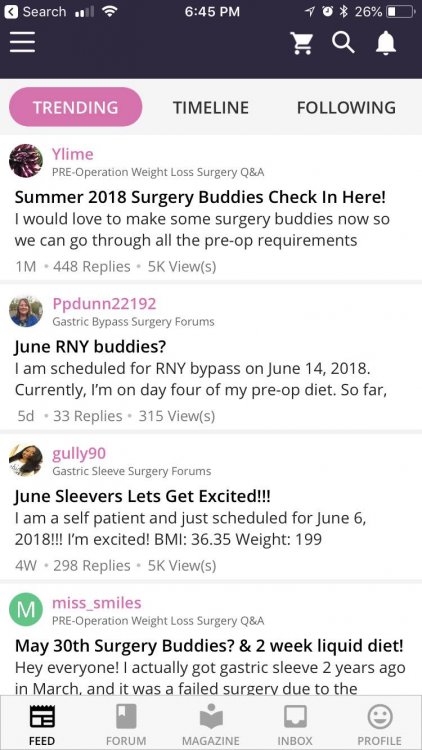
My app for the iPhone keeps crashing whenever I try to look at notifications. Not sure why. Something going on? It worked at first with the new app but now for the past couple of days it just crashes.
  • Replies 12
  • Views 6.8k
  • Created
  • Last Reply

Top Posters In This Topic

Most Popular Posts

  • Thanks for reporting this! Can you let me know what version of the app you’re currently using? It should be listed at the bottom of the expanding menu, which is accessible by tapping the 3 lines a

  • TakingABreak
    TakingABreak

    Working for me

  • osborne.t.corey
    osborne.t.corey

    It’s working now. Thank you!

Posted Images
Featured Replies

  • Author
Also want to add, it also crashes when I try to look at the timeline.
Thanks for reporting this! Can you let me know what version of the app you’re currently using?

It should be listed at the bottom of the expanding menu, which is accessible by tapping the 3 lines at the top left of the app screen.

Rest assured we’ll get to the bottom of this :-)

Again, thanks for letting us know!

image-0.00298023223876953.jpg

  • Author
V-6.0.6

I'm on V-6.0.6 and it also crashes when trying to go to timeline, notifications and search.

12 hours ago, SIPS in Seattle said:

V-6.0.6

@Ken S. mine is doing the same.... V-6.0.6

3 minutes ago, Ken S. said:

Sorry for the delay all! I couldn't find my magic wand - but finally I have...I think you should all be good to go now.

Please let us know :-)

Working for me :)

06/07/2018 09:48 AM, Ken S. said:


Sorry for the delay all! I couldn't find my magic wand - but finally I have...I think you should all be good to go now.


Please let us know :-)


It’s working now. Thank you!
Awesome Ken, ty!
  • 1 year later...

Hi Ken!

joined today on a brand new iPhone 11 and once installed I can’t open the app. Crashes nonstop. Using iOS 13. Maybe not supported yet?

thanks

Join the conversation

You can post as a guest; create a free account to track replies, follow topics, and be part of the largest weight loss surgery community.

Join the conversation

You can post now and register later. If you have an account, sign in now to post with your account.

Guest
Reply to this topic...

Account

Navigation

Search

Search

Configure browser push notifications

Chrome (Android)
  1. Tap the lock icon next to the address bar.
  2. Tap Permissions → Notifications.
  3. Adjust your preference.
Chrome (Desktop)
  1. Click the padlock icon in the address bar.
  2. Select Site settings.
  3. Find Notifications and adjust your preference.