Skip to content
View in the app

A better way to browse. Learn more.

BariatricPal

A full-screen app on your home screen with push notifications, badges and more.

To install this app on iOS and iPadOS
  1. Tap the Share icon in Safari
  2. Scroll the menu and tap Add to Home Screen.
  3. Tap Add in the top-right corner.
To install this app on Android
  1. Tap the 3-dot menu (⋮) in the top-right corner of the browser.
  2. Tap Add to Home screen or Install app.
  3. Confirm by tapping Install.
  • Appearance

Join BariatricPal free

  • Ask your own questions
  • Reply and follow topics
  • Message other members
  • No cost, no spam

pop up

@Alex Brecher

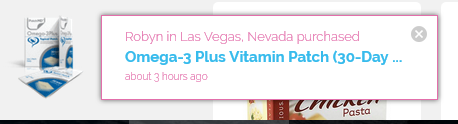
I'm now getting pop ups in the bottom left hand corner of the screen.

The other posts are describing a person's name buying a BP product.

DH captured the attached popup.

Tom

pop up.PNG

  • Replies 10
  • Views 1.8k
  • Created
  • Last Reply

Top Posters In This Topic

Most Popular Posts

  • Alex Brecher
    Alex Brecher

    Click the X

  • ChaosUnlimited
    ChaosUnlimited

    I saw that also and once I clicked the x they stopped, thankfully, because I like this forum. I hate those types of pop ups, I don't care what anyone else is buying. When I shop, if the site has what

  • ProudGrammy
    ProudGrammy

    @ChaosUnlimited thanx for responding btw i luv your smile and sun glasses too!! 117 lbs gone - you are aces!! kathy

Posted Images
Featured Replies

  • Author
2 minutes ago, Alex Brecher said:

Those are advertisements. You can click the X to ignore them.

is there a way to block the pop ups entirely??

I saw that also and once I clicked the x they stopped, thankfully, because I like this forum. I hate those types of pop ups, I don't care what anyone else is buying. When I shop, if the site has what people are buying popping up constantly, I'm done. I don't know who thought that kind of advertising is a good idea.

  • Author

@Alex Brecher @ChaosUnlimited

thank you both

i had already been pushing that X.

pop up disappears, then it comes up

with the next post.:wacko:

oh well, i guess there are worse things

in the world

  • Author
28 minutes ago, Alex Brecher said:

Click the X

@Alex Brecher

looks good to me now

you are my hero:rolleyes:

thanx

  • Author
29 minutes ago, ChaosUnlimited said:

I hate those types of pop up

@ChaosUnlimited

thanx for responding

btw i luv your smile and

sun glasses too!!

117 lbs gone - you are aces!!:rolleyes:

kathy

Those pop ups are even worse when you are on the shopping side. I just ignore them as I know what I want.

  • Author
2 minutes ago, ssflbelle said:

pop ups are even worse when you are on the shopping side. I ignore them

@ssflbelle

Amanda - always great to

see/hear from you. 286 lbs gone!!

sad i am seeing "less and less of you"

you are my hero too!!:rolleyes:

hugggs

kathy

7 minutes ago, proudgrammy said:

@ssflbelle

Amanda - always great to

see/hear from you. 286 lbs gone!!

sad i am seeing "less and less of you"

you are my hero too!!:rolleyes:

hugggs

kathy

Thanks Kathy I so enjoy your positive postings especially today as it looks like my Brachioplasty on Feb 12th may not happen.

Join the conversation

You can post as a guest; create a free account to track replies, follow topics, and be part of the largest weight loss surgery community.

Join the conversation

You can post now and register later. If you have an account, sign in now to post with your account.

Guest
Reply to this topic...

Account

Navigation

Search

Search

Configure browser push notifications

Chrome (Android)
  1. Tap the lock icon next to the address bar.
  2. Tap Permissions → Notifications.
  3. Adjust your preference.
Chrome (Desktop)
  1. Click the padlock icon in the address bar.
  2. Select Site settings.
  3. Find Notifications and adjust your preference.