Skip to content
View in the app

A better way to browse. Learn more.

BariatricPal

A full-screen app on your home screen with push notifications, badges and more.

To install this app on iOS and iPadOS
  1. Tap the Share icon in Safari
  2. Scroll the menu and tap Add to Home Screen.
  3. Tap Add in the top-right corner.
To install this app on Android
  1. Tap the 3-dot menu (⋮) in the top-right corner of the browser.
  2. Tap Add to Home screen or Install app.
  3. Confirm by tapping Install.
  • Appearance

Join BariatricPal free

  • Ask your own questions
  • Reply and follow topics
  • Message other members
  • No cost, no spam

BariatricPal Mobile App Beta for iOS!

Hey BariatricPal members, we’re finally ready to release the first beta version of our very own BariatricPal Mobile app for iOS! This new release is a complete rewrite of the mobile app from the ground up. In addition to the forums, we’ve also added native magazine support and user galleries to the new app. The ability to “Like” posts and other content has also been overhauled to support reactions in addition to simply liking content.

While we have dedicated a tremendous amount of time into development and testing of the new BariatricPal app, we do expect there to be bugs and issues in this early release. We are hopeful that you are interested in helping us make the BariatricPal mobile app the absolute best in can possibly be. We welcome all of you to join and test the BariatricPal app and absolutely all feedback will be greatly appreciated.

You’re welcome to post feedback, comments and suggestions directly to this topic, or e-mail us at app@BariatricPal.com. If you’re ready to join in, simply fill out the form below with your Apple ID e-mail address and your BariatricPal username and we’ll send you an invite with all of the information you need as soon as possible.

Thank you and happy testing!!

  • Replies 13
  • Views 17.3k
  • Created
  • Last Reply

Top Posters In This Topic

Most Popular Posts

  • @Newme17 Excellent - thank you so very much for finding and reporting this bug! This is what will help us get the app experience to be as good as possible! P.S. How has the app been working

Posted Images
Featured Replies

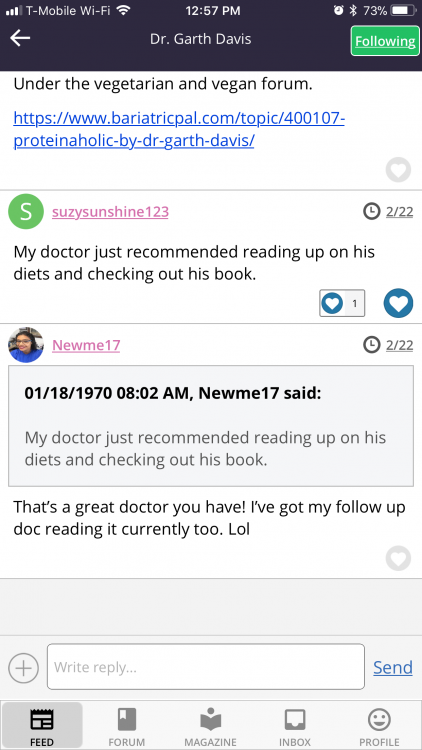
Here’s one:

I quoted a comment on the app. It shows the quote to be originated by myself, not the poster, and some crazy date and time as well.

54998BD6-1512-449A-82ED-F095755C87D4.png

  • Author

@Newme17

Excellent - thank you so very much for finding and reporting this bug! This is what will help us get the app experience to be as good as possible!

P.S. How has the app been working for you in general?

Thanks again!

In general it’s fine so far. I’ll play around with it some more to figure if there’s anything else that can be streamlined or fixed.

I’ve got one...is it possible to add/see what topic or sub topic a thread is coming from? Currently it’s just listed as the thread topic. Wouldn’t know if it’s meant to be in the Powder Room, the Men’s Room, Rant/Rave, Nutrition, Exercise, Pre or Post Ops, or even what WLS topic.
The above suggestion is for under the FEED. No editing ability?
18 hours ago, Newme17 said:

I’ve got one...is it possible to add/see what topic or sub topic a thread is coming from? Currently it’s just listed as the thread topic. Wouldn’t know if it’s meant to be in the powder Room, the Men’s Room, Rant/Rave, Nutrition, Exercise, Pre or Post Ops, or even what WLS topic.

I get to rest my case...this morning I tried to comment and kept getting NO PERMISSIONS. At first, I thought maybe it's a glitch and then I logged on to the website by computer and saw that the thread I was trying to comment on is in the Veteran's Forum. So, no wonder why I couldn't post. Thus, there is no way to tell what forum a thread is in on the app, under TRENDING and TIMELINE. Only way is to access the forums by subject is under FORUM. But if the TRENDING and TIMELINE and even FOLLOWING is like the dashboard of the app, it'll make sense to be able to see what the forum topics are for each of the threads. Make sense?

  • 3 months later...
Is anyone else having trouble with their notifications on the phone app? Mine gives me an error message every time since the most recent update.
  • 3 weeks later...
Two bugs to report... I can no longer quote individuals in the iOS app. Also, when trying to change my profile picture, it keeps saying validating session and never updates.
  • 1 year later...

I keep reading that there is a link to report offensive posts but I sure don’t see it on my iPhone. Can someone give more specific location information?

  • 3 years later...

I'm so excited to hear about the BariatricPal Mobile App Beta for iOS! It sounds like a great way to stay connected with the BariatricPal community, right from your phone! I can't wait to try it out and see all the cool features it has to offer. I'm sure it will be a great way to stay on track with my diet and fitness goals. I'm sure it will be useful to have all the helpful tips and advice right at my fingertips.

I'm so excited about the launch of the new BariatricPal Mobile App Beta for iOS! I'm looking forward to giving it a try and to giving my feedback. I'm sure with all of us testing and giving feedback, this app will be the absolute best it can be! I'm sure there will be some bugs and issues, but that just makes us part of the team to help make the app even better! Also, I'd like to give a shout-out to https://smartengines.com/ for their advanced AI products with a wide range of capabilities for mobile applications. These products can help make every app even smarter and easier for users. Check them out if you are looking for ways to improve the user experience!

Edited by RickyTiller

  • 9 months later...
Soooo…. I’m a new user. I have to say the app is great in theory but it is a tad bit “clunky “ to navigate.

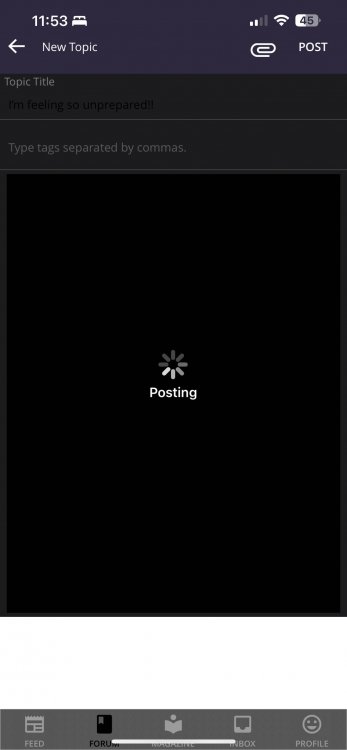
When I went to update my profile with my date of birth the pop up came up and was all white. I could not see anything it took me a lot of trial and error to finally get my date in there. mostly it was just swiping and tapping then checking if I was right.

Also I have not been able to figure out how to reply to anyone’s original post. When I go to the post from the email notifications it gives me the “reply to this post” option but not when I am in the feed and click on a post. I’m using an IPhone
There are a few other things but I will play around with it for a while. My son does app work and website design so he has been helping me.

I think the app needs more definition for each category >post>replies

Like I said I’m new so it will take me a minute to get through the process
Hey there. I know I posted before but I can not edit that post so I am just doing another one. This is what I was talking about. Some of the areas that you are entering text (profile date of birth pop out) this was trying to make the previous post to create a new topic. I am not sure if anyone else is having this problem. But I can not see anything I am typing. This is what it looked like when I was trying to type. I had hit submit before I took the screenshot. I had to highlight the whole thing to read it before I posted.

image-0.00095367431640625.jpg

Join the conversation

You can post as a guest; create a free account to track replies, follow topics, and be part of the largest weight loss surgery community.

Join the conversation

You can post now and register later. If you have an account, sign in now to post with your account.

Guest
Reply to this topic...

Account

Navigation

Search

Search

Configure browser push notifications

Chrome (Android)
  1. Tap the lock icon next to the address bar.
  2. Tap Permissions → Notifications.
  3. Adjust your preference.
Chrome (Desktop)
  1. Click the padlock icon in the address bar.
  2. Select Site settings.
  3. Find Notifications and adjust your preference.