Skip to content
View in the app

A better way to browse. Learn more.

BariatricPal

A full-screen app on your home screen with push notifications, badges and more.

To install this app on iOS and iPadOS
  1. Tap the Share icon in Safari
  2. Scroll the menu and tap Add to Home Screen.
  3. Tap Add in the top-right corner.
To install this app on Android
  1. Tap the 3-dot menu (⋮) in the top-right corner of the browser.
  2. Tap Add to Home screen or Install app.
  3. Confirm by tapping Install.
  • Appearance

Join BariatricPal free

  • Ask your own questions
  • Reply and follow topics
  • Message other members
  • No cost, no spam

Progress

  • Popular Post

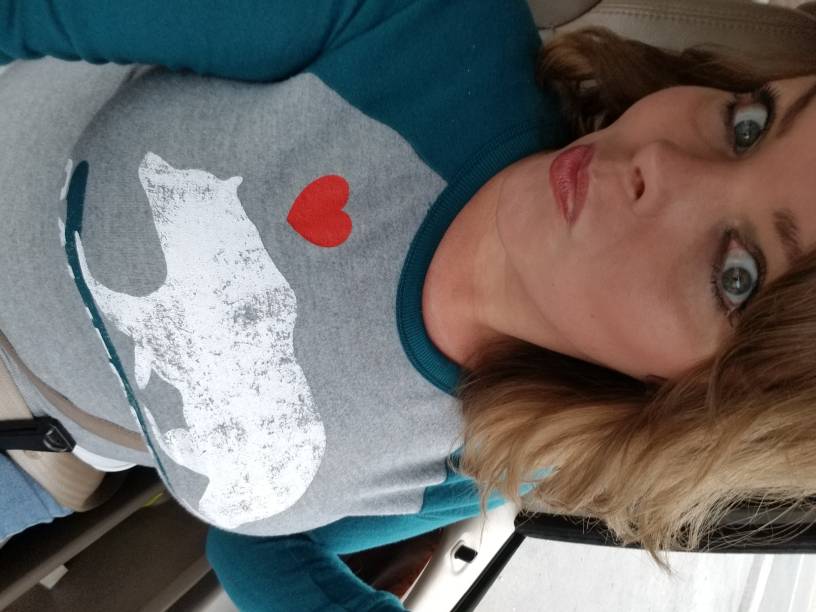
I had my sleeve on June 28th. My first weigh in was 236 pounds. Now, I'm down to about 160. It'll feel slow at times, but then it will hit at once. Lol, I was wearing pants two sizes too big the other week because I didn't realize my size. It does take time for the brain to catch up to the weight loss. I'm still working on me and still progressing but so blessed. 20171204_142628.jpg

Sent from my SM-G955U using BariatricPal mobile app

  • Replies 6
  • Views 1.6k
  • Created
  • Last Reply

Top Posters In This Topic

Most Popular Posts

  • Healthy_life2
    Healthy_life2

    Congrats hope your pants didn't fall to your ankles!

  • BrandiceLeSha
    BrandiceLeSha

    Thanks! It's been that way all the way through my journey. Sometimes I go weeks struggling over a pound. Other times, the pounds just come off like crazy. But some of the staff at my doctors office to

Posted Images

Featured Replies

6 minutes ago, BrandiceLeSha said:

I had my sleeve on June 28th. My first weigh in was 236 pounds. Now, I'm down to about 160. It'll feel slow at times, but then it will hit at once. Lol, I was wearing pants two sizes too big the other week because I didn't realize my size. It does take time for the brain to catch up to the weight loss. I'm still working on me and still progressing but so blessed. 20171204_142628.jpg
Sent from my SM-G955U using BariatricPal mobile app

Congrats hope your pants didn't fall to your ankles!

pantsfall.jpg

  • Author
Congrats hope your pants didn't fall to your ankles!
pantsfall.jpg.44cfbfce79fa6c026363f47ac1ab8648.jpg

Lol, they did try to!

Sent from my SM-G955U using BariatricPal mobile app

Yay! @BrandiceLeSha - you look good! We have the same starting weight (although I am waaaay older than you lol).

And at 6 wks out I weigh 195 - it has been in slow motion lately - one pound/week the last 3 weeks...ugh!!!

  • Author
Yay! [mention=318518]BrandiceLeSha[/mention] - you look good! We have the same starting weight (although I am waaaay older than you lol).
And at 6 wks out I weigh 195 - it has been in slow motion lately - one pound/week the last 3 weeks...ugh!!!

Thanks! It's been that way all the way through my journey. Sometimes I go weeks struggling over a pound. Other times, the pounds just come off like crazy. But some of the staff at my doctors office told me to stop being so hard on myself. Lol, and it's so much easier now. If the scale don't move, usually the inches still do. So, I've learned to focus on the journey. I've still got a great journey left!

Sent from my SM-G955U using BariatricPal mobile app

Congrats your doing awesome. Similar start w I can't wait to be 160

Sent from my Vivo 5R using BariatricPal mobile app

  • Author
Congrats your doing awesome. Similar start w I can't wait to be 160

Sent from my Vivo 5R using BariatricPal mobile app


You'll bee there before you know it

Sent from my SM-G955U using BariatricPal mobile app

Join the conversation

You can post as a guest; create a free account to track replies, follow topics, and be part of the largest weight loss surgery community.

Join the conversation

You can post now and register later. If you have an account, sign in now to post with your account.

Guest
Reply to this topic...

Account

Navigation

Search

Search

Configure browser push notifications

Chrome (Android)
  1. Tap the lock icon next to the address bar.
  2. Tap Permissions → Notifications.
  3. Adjust your preference.
Chrome (Desktop)
  1. Click the padlock icon in the address bar.
  2. Select Site settings.
  3. Find Notifications and adjust your preference.