Skip to content
View in the app

A better way to browse. Learn more.

BariatricPal

A full-screen app on your home screen with push notifications, badges and more.

To install this app on iOS and iPadOS
  1. Tap the Share icon in Safari
  2. Scroll the menu and tap Add to Home Screen.
  3. Tap Add in the top-right corner.
To install this app on Android
  1. Tap the 3-dot menu (⋮) in the top-right corner of the browser.
  2. Tap Add to Home screen or Install app.
  3. Confirm by tapping Install.
  • Appearance

Join BariatricPal free

  • Ask your own questions
  • Reply and follow topics
  • Message other members
  • No cost, no spam

Progress chart view

I have been away for awhile due to remodeling and a move and I just noticed the update to the site today. I went to enter my new weight and look at my "chart view" but it is showing starting at the date of 1970 and not from the date I had used for my starting weight. It's pretty weird. Anyway, thought I would post it here since it was not like this before the update and also it's kind of hard to read the chart now lol.

  • Replies 2
  • Views 1.1k
  • Created
  • Last Reply

Top Posters In This Topic

Most Popular Posts

  • @Lizardlady I believe this should be resolved now, please let me know if that's not the case for you. @orionburn We hope to have a fix for this in place fairly soon. Unfortunately the bug is wit

Posted Images
Featured Replies

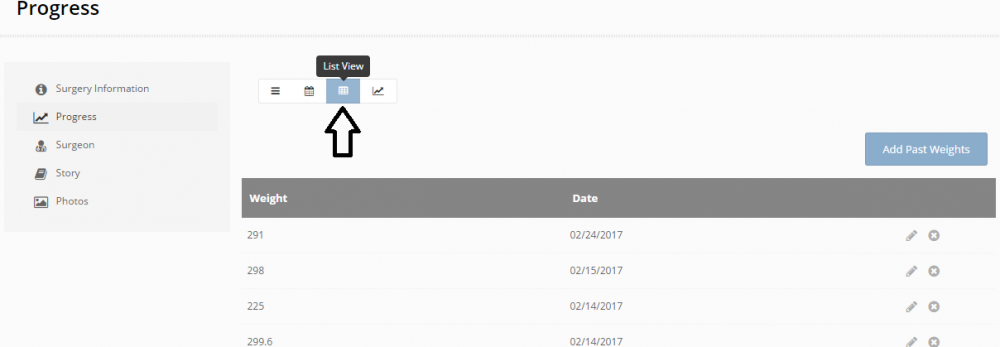
Click on the option to the left of the chart for the list view. There it will show all your entered weights. You can edit the weight and/or date individually.

For what it's worth I'm still having troubles getting it to display right with my goal weight factored in. I always end up with a strange blip at the end of the chart run.

Untitled.png

@Lizardlady I believe this should be resolved now, please let me know if that's not the case for you.

@orionburn We hope to have a fix for this in place fairly soon. Unfortunately the bug is within a 3rd parties code, and we have to await their fix.

Join the conversation

You can post as a guest; create a free account to track replies, follow topics, and be part of the largest weight loss surgery community.

Join the conversation

You can post now and register later. If you have an account, sign in now to post with your account.

Guest
Reply to this topic...

Account

Navigation

Search

Search

Configure browser push notifications

Chrome (Android)
  1. Tap the lock icon next to the address bar.
  2. Tap Permissions → Notifications.
  3. Adjust your preference.
Chrome (Desktop)
  1. Click the padlock icon in the address bar.
  2. Select Site settings.
  3. Find Notifications and adjust your preference.