Skip to content
View in the app

A better way to browse. Learn more.

BariatricPal

A full-screen app on your home screen with push notifications, badges and more.

To install this app on iOS and iPadOS
  1. Tap the Share icon in Safari
  2. Scroll the menu and tap Add to Home Screen.
  3. Tap Add in the top-right corner.
To install this app on Android
  1. Tap the 3-dot menu (⋮) in the top-right corner of the browser.
  2. Tap Add to Home screen or Install app.
  3. Confirm by tapping Install.
  • Appearance

Join BariatricPal free

  • Ask your own questions
  • Reply and follow topics
  • Message other members
  • No cost, no spam

BariatricPal App

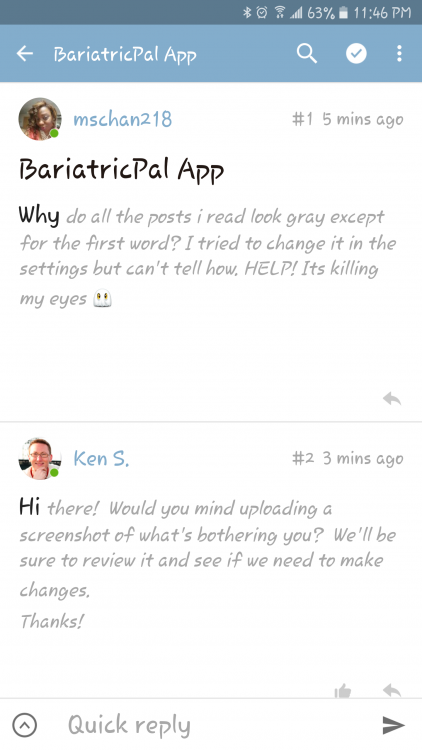
Why do all the posts i read look gray except for the first word? I tried to change it in the settings but can't tell how. HELP! Its killing my eyes

  • Replies 5
  • Views 2.4k
  • Created
  • Last Reply

Top Posters In This Topic

Most Popular Posts

  • Hi there! Would you mind uploading a screenshot of what's bothering you? We'll be sure to review it and see if we need to make changes. Thanks!

  • Here you go...thanks!

  • Had to upload it in web browser mode. Wouldnt let me do it in the app.

Posted Images
Featured Replies

  • 1 month later...

how do i fix/change my signature

spacing between lines is too much also

such a gap

thanx @Ken C

kathy

@Alex Brecher

under my name on the left (profile pic) there is a pic of a different person!!

the info i wrote is correct, but the pic is wrong

i would like to know how to fix my signature

i wish there was a chapter/book Q&A about how to do things

it would be very helpful to newbies - through VETS

i am a healthier, happier VET - 5+ year - i'm still standing!!

i would be happier if i knew the above answers:rolleyes:

TIA

Kathy

Join the conversation

You can post as a guest; create a free account to track replies, follow topics, and be part of the largest weight loss surgery community.

Join the conversation

You can post now and register later. If you have an account, sign in now to post with your account.

Guest
Reply to this topic...

Account

Navigation

Search

Search

Configure browser push notifications

Chrome (Android)
  1. Tap the lock icon next to the address bar.
  2. Tap Permissions → Notifications.
  3. Adjust your preference.
Chrome (Desktop)
  1. Click the padlock icon in the address bar.
  2. Select Site settings.
  3. Find Notifications and adjust your preference.