Skip to content
View in the app

A better way to browse. Learn more.

BariatricPal

A full-screen app on your home screen with push notifications, badges and more.

To install this app on iOS and iPadOS
  1. Tap the Share icon in Safari
  2. Scroll the menu and tap Add to Home Screen.
  3. Tap Add in the top-right corner.
To install this app on Android
  1. Tap the 3-dot menu (⋮) in the top-right corner of the browser.
  2. Tap Add to Home screen or Install app.
  3. Confirm by tapping Install.

One Year Surgiversary

  • Popular Post

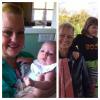
Well we made it. One year ago we had this life altering surgery.

I'm down 110 pounds with no problems at all. I feel great and look so much better. hair is coming back in and loose skin doesn't show in clothes much. I'll deal with that after the last 59 pounds are gone. Or not. At almost 66 it's not the highest of my priorities. I can walk without crying. I can dance again. I can play with my grandchildren. Shopping. Yay!! post-258729-14795892517859_thumb.pngpost-258729-14795892950001_thumb.jpg
Sent from my iPhone using Tapatalk

  • Replies 2
  • Views 635
  • Created
  • Last Reply

Featured Replies

  • Author

Thanks! Congrats to you too!!

Sent from my iPhone using Tapatalk

Archived

This topic is now archived and is closed to further replies.

Trending Products

PatchAid Vitamin Patches

Account

Navigation

Search

Search

Configure browser push notifications

Chrome (Android)
  1. Tap the lock icon next to the address bar.
  2. Tap Permissions → Notifications.
  3. Adjust your preference.
Chrome (Desktop)
  1. Click the padlock icon in the address bar.
  2. Select Site settings.
  3. Find Notifications and adjust your preference.