



NSV...holy cow
- Views 436
- Created
- Last Reply
Posted Images
Featured Replies
Join the conversation
You can post as a guest; create a free account to track replies, follow topics, and be part of the largest weight loss surgery community.

A better way to browse. Learn more.
A full-screen app on your home screen with push notifications, badges and more.
Join BariatricPal free
You can post as a guest; create a free account to track replies, follow topics, and be part of the largest weight loss surgery community.
Find support for your bariatric or GLP-1 journey. Save helpful conversations and take part when you are ready.
Choose your email preferences on the registration form.
Already a member? Sign in
Some of you may remember me asking about running after surgery. If not, my husband is a runner, runs ultra "insane" marathons. I want nothing to be able to run with him.
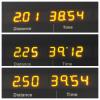
Now that my weight is down (almost 70lbs) I thought I'd try a little. I've been walking but haven't really pushed myself till now. This is my progress over the last 3 days. Shew, I may be feeling it by the end of the week. This is Monday, Tuesday and today's distance and time. I'm increasing the pace and distance by 1/4 mile each day.
Sent from my iPhone using the BariatricPal App
Edited by cindyw41