Skip to content
View in the app

A better way to browse. Learn more.

BariatricPal

A full-screen app on your home screen with push notifications, badges and more.

To install this app on iOS and iPadOS
  1. Tap the Share icon in Safari
  2. Scroll the menu and tap Add to Home Screen.
  3. Tap Add in the top-right corner.
To install this app on Android
  1. Tap the 3-dot menu (⋮) in the top-right corner of the browser.
  2. Tap Add to Home screen or Install app.
  3. Confirm by tapping Install.

7 months post op

  • Popular Post

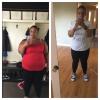
I'll be 7 months post op next week. I'm down 106 pounds. I'm proud of my progress but I am still having issues with seeing myself as a smaller me.

post-233125-14635133650756_thumb.jpg

  • Replies 14
  • Views 1.2k
  • Created
  • Last Reply

Featured Replies

  • Author

Thanks, If you need any support, etc feel free to contact me. Good luck!!

Seven months.....Super job. You look great. You definitely have the process down pat.

Just keep looking in the mirror.......and that "smaller you issue" will vanish.......replaced with "damn, I look good"!! ;)

BTW......stop looking at the phone.....eyes up .....show us that smile, you earned it. :P

  • Author

@@Recycled Thanks!! You're so right more smiling :)

@@sabbahat Thanks! Good luck on your journey!

HOLY MACRO YOU LOOK AWESOME. CONGRATULATIONS!!!

You are doing great !!!!!!!!

Congrats, you look great!! I know you don't feel smaller at this time, it took me a few years to REALLY feel it. Even after a TT/Panni. I still have times, like change of season, or buying new clothes where I'm surprised that something fits. One thing that helps is looking at old photos or clothes, seeing the numbers I wrote down during my losing phase, going to support group (where I am always asked to speak) and remembering my FIRST pre-op support group & where I came from. Also helps me to not become complacent with my eating & excercise.

Archived

This topic is now archived and is closed to further replies.

Trending Products

PatchAid Vitamin Patches

Account

Navigation

Search

Search

Configure browser push notifications

Chrome (Android)
  1. Tap the lock icon next to the address bar.
  2. Tap Permissions → Notifications.
  3. Adjust your preference.
Chrome (Desktop)
  1. Click the padlock icon in the address bar.
  2. Select Site settings.
  3. Find Notifications and adjust your preference.