Skip to content
View in the app

A better way to browse. Learn more.

BariatricPal

A full-screen app on your home screen with push notifications, badges and more.

To install this app on iOS and iPadOS
  1. Tap the Share icon in Safari
  2. Scroll the menu and tap Add to Home Screen.
  3. Tap Add in the top-right corner.
To install this app on Android
  1. Tap the 3-dot menu (⋮) in the top-right corner of the browser.
  2. Tap Add to Home screen or Install app.
  3. Confirm by tapping Install.

Mobile View?

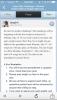
Has anyone else had trouble with threads not being viewed all the way on the mobile version? I'm running a weight loss challenge and noticed several people didn't know when the challenge started or other information that was clearly stated in the first thread. I then viewed my own post in the mobile version to discover the whole thing wasn't there! I double checked on the computer to make sure the whole thing actually posted and it did. I took a screenshot of my thread off the mobile version. I'm wondering if it's because I reviewed the post before publishing it?post-221785-14368817413187_thumb.jpg
  • Replies 9
  • Views 906
  • Created
  • Last Reply

Featured Replies

  • Author

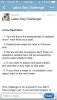
This is the thread from the desktop view or whatever it's called. But you can see there is the missing information!

post-221785-14368818598556_thumb.jpg

I had not noticed this....but some things make more sense n ow. Have you reported the issue?

  • Author

I had not noticed this....but some things make more sense n ow. Have you reported the issue?

I wasn't sure where to even start!

  • Author

I used the website. I had copied and pasted the reminder section from a post from the previous challenge. I previewed the post before I posted it.

When viewing the post earlier today, I used the app. I have an iPhone6 plus.

I think this had something to do with the way you copy and pasted it - not sure what exactly, but there was text background color which we don't have on here...and a ton of back to back spans.

Were you using Word or other software to edit the post at some point?

I've edited your post and it's showing up fine right now for all mediums.

  • Author

I think this had something to do with the way you copy and pasted it - not sure what exactly, but there was text background color which we don't have on here...and a ton of back to back spans.

Were you using Word or other software to edit the post at some point?

I've edited your post and it's showing up fine right now for all mediums.

Someone else was running the challenges before me, so I just copied/pasted her rules (the reminder section) and edited them a little, but within the BP posting section. Thanks for fixing it for me! I really appreciate it!

Archived

This topic is now archived and is closed to further replies.

Trending Products

PatchAid Vitamin Patches

Account

Navigation

Search

Search

Configure browser push notifications

Chrome (Android)
  1. Tap the lock icon next to the address bar.
  2. Tap Permissions → Notifications.
  3. Adjust your preference.
Chrome (Desktop)
  1. Click the padlock icon in the address bar.
  2. Select Site settings.
  3. Find Notifications and adjust your preference.