Skip to content
View in the app

A better way to browse. Learn more.

BariatricPal

A full-screen app on your home screen with push notifications, badges and more.

To install this app on iOS and iPadOS
  1. Tap the Share icon in Safari
  2. Scroll the menu and tap Add to Home Screen.
  3. Tap Add in the top-right corner.
To install this app on Android
  1. Tap the 3-dot menu (⋮) in the top-right corner of the browser.
  2. Tap Add to Home screen or Install app.
  3. Confirm by tapping Install.

First Thanksgiving post sleeve...

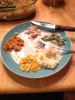
What I started with...post-204117-14171365553875_thumb.jpg

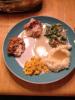
What I ended with...post-204117-14171365810222_thumb.jpg

Hahahaha!!! :)

Happy Thanksgiving everyone!!!

  • Replies 5
  • Views 902
  • Created
  • Last Reply

Featured Replies

That's awesome!

Well, what I started with , while significantly less than I ever would have put on my plate before sleeve surgery, was a much fuller plate than yours. That said, what I ended with arguably looked exactly the same as what I started with.

I was able to eat 1 (of 2) piece of ham, one bite of mashed potatoes, none of the turkey, 1-2 bites of green bean casserole, and about 2 ounces of sweet potato. At the end, I honestly could hardly tell myself what I had eaten vs what I hadn't. And the strange/fun fact thing was the whole time everyone else was eating, I was sitting there with a full plate not ogling what I could not eat. It was just "stuff" sitting there, of virtually no interest to me.

Chalk up a win for sleeve surgery!

Mine looked the same way. It's my first Thanksgiving too. Strange not to have seconds and even stranger was that I was so stuffed with so little. Happy Day!

Good job with your eating guys!! And Happy Thanksgiving!!

I am only 4 1/2 weeks post op so I was able to only eat 2.4oz of turkey with a very little gravy on it. I put a kiddie size spoonful of mashed potatoes on my plate, but didn't touch them. I was full and pretty satisfied.

Nice! Try using a smaller plate next time...haha! Glad you did well.

Archived

This topic is now archived and is closed to further replies.

Trending Products

PatchAid Vitamin Patches

Account

Navigation

Search

Search

Configure browser push notifications

Chrome (Android)
  1. Tap the lock icon next to the address bar.
  2. Tap Permissions → Notifications.
  3. Adjust your preference.
Chrome (Desktop)
  1. Click the padlock icon in the address bar.
  2. Select Site settings.
  3. Find Notifications and adjust your preference.