Skip to content
View in the app

A better way to browse. Learn more.

BariatricPal

A full-screen app on your home screen with push notifications, badges and more.

To install this app on iOS and iPadOS
  1. Tap the Share icon in Safari
  2. Scroll the menu and tap Add to Home Screen.
  3. Tap Add in the top-right corner.
To install this app on Android
  1. Tap the 3-dot menu (⋮) in the top-right corner of the browser.
  2. Tap Add to Home screen or Install app.
  3. Confirm by tapping Install.

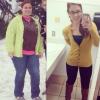
Finally achieved a normal BMI!

  • Popular Post

Today the doctor weighed me and I officially have a normal BMI! Such a huge victory for me! I'm now down a total of 114 pounds! post-180820-14122953673547_thumb.jpgpost-180820-14122953906512_thumb.jpg

  • Replies 7
  • Views 878
  • Created
  • Last Reply

Featured Replies

Oh my gosh, so so amazing!! Look at how small your waist is, girl!

  • Author

Oh my gosh, so so amazing!! Look at how small your waist is, girl!

Aww thank you!!

This is my goal! Awesome for you!

  • Author

This is my goal! Awesome for you!

Thank you! You'll be there before you know it!

You look so great! And rocking the boots. Can't wait to be able to buy boots without worrying about my big ol' calves!

Congrats! It's a great feeling to "be normal". It's an accomplishment that we in the forums understand so well.

  • Author

Congrats! It's a great feeling to "be normal". It's an accomplishment that we in the forums understand so well.

Thank you! "Normal" is definitely a great feeling!

Archived

This topic is now archived and is closed to further replies.

Trending Products

PatchAid Vitamin Patches

Account

Navigation

Search

Search

Configure browser push notifications

Chrome (Android)
  1. Tap the lock icon next to the address bar.
  2. Tap Permissions → Notifications.
  3. Adjust your preference.
Chrome (Desktop)
  1. Click the padlock icon in the address bar.
  2. Select Site settings.
  3. Find Notifications and adjust your preference.