




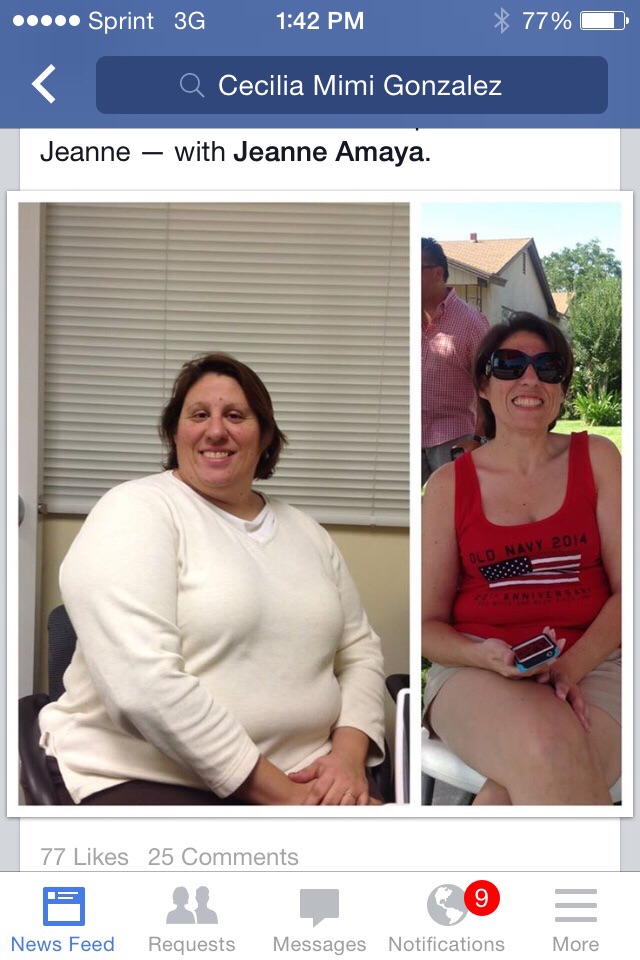
 pre surgery weight 306. And now 165. Feeling wonderful and loving myself again! A word of advice: keep getting support and go to therapy or support groups. It will help from gaining the weight again.
18 months and counting
pre surgery weight 306. And now 165. Feeling wonderful and loving myself again! A word of advice: keep getting support and go to therapy or support groups. It will help from gaining the weight again.
- Replies 3
- Views 772
- Created
- Last Reply
Top Posters In This Topic
-
James Marusek 1 post
-
lovebugg2013 1 post
-
Beni 1 post



Popular Days
Most Popular Posts
-
Congrats and thank you for the advice.
-
Great advice! You look great!
-
Congratulations on the amount of weight that you lost. Enjoy life.
Posted Images

Featured Replies
Join the conversation
You can post as a guest; create a free account to track replies, follow topics, and be part of the largest weight loss surgery community.