




NYC/LI/Tri-State area support group
- Replies 2
- Views 512
- Created
- Last Reply


Popular Days
Most Popular Posts
-
It WAS a great meeting - thanks everyone!! Looking forward to the meeting in August!!!! Thanks for the inspiration & support
Posted Images
Featured Replies
Join the conversation
You can post as a guest; create a free account to track replies, follow topics, and be part of the largest weight loss surgery community.
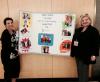
Just wanted to post on the main forum a big thank you to the folks who came out yesterday and made our first BariatricPal Support Group a great success. Thanks as well to Lisa for her dedication and organizational skills. And thanks to Alex for attending and giving us a great insight into what it means to live a normal, regular life as a person who had WLS. I must say that I'm truly inspired by all of you. Here's a picture of Lisa and me with the wonderful poster she and her husband Ken made. The poster itself is a work of art, and the pictures on it, also works of art in terms of living healthier lives.