Skip to content
View in the app

A better way to browse. Learn more.

BariatricPal

A full-screen app on your home screen with push notifications, badges and more.

To install this app on iOS and iPadOS
  1. Tap the Share icon in Safari
  2. Scroll the menu and tap Add to Home Screen.
  3. Tap Add in the top-right corner.
To install this app on Android
  1. Tap the 3-dot menu (⋮) in the top-right corner of the browser.
  2. Tap Add to Home screen or Install app.
  3. Confirm by tapping Install.

5 Short months

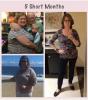
I have always been camera shy for many reasons, mostly due to my weight. This little collage shows me 8 days prior to surgery, the second is 1 month post op and the last is this my 5 month post op picture (this week) .

I can't believe the changes in myself in only 5 months. The old me would NEVER post pictures of myself. While I haven't lost any pounds in the last 2 weeks , I have dropped another pant size, going from 20 down to 12 so far. I love my sleeve, it's been life changing for me.

post-179195-0-42670200-1393813903_thumb.jpg

  • Replies 34
  • Views 5.6k
  • Created
  • Last Reply

Featured Replies

You look fabulous! I still cannot wrap my head around the fact that may be ME one day posting photos as I am still preop....keep up the great work!

You look wonderful! Congrats, you should feel

proud of yourself!!

You look awesome! Congrats!

I have always been camera shy for many reasons, mostly due to my weight. This little collage shows me 8 days prior to surgery, the second is 1 month post op and the last is this my 5 month post op picture (this week) .

I can't believe the changes in myself in only 5 months. The old me would NEVER post pictures of myself. While I haven't lost any pounds in the last 2 weeks , I have dropped another pant size, going from 20 down to 12 so far. I love my sleeve, it's been life changing for me.

Woohoo u look awesome. ..

Archived

This topic is now archived and is closed to further replies.

Trending Products

PatchAid Vitamin Patches

Account

Navigation

Search

Search

Configure browser push notifications

Chrome (Android)
  1. Tap the lock icon next to the address bar.
  2. Tap Permissions → Notifications.
  3. Adjust your preference.
Chrome (Desktop)
  1. Click the padlock icon in the address bar.
  2. Select Site settings.
  3. Find Notifications and adjust your preference.