Skip to content
View in the app

A better way to browse. Learn more.

BariatricPal

A full-screen app on your home screen with push notifications, badges and more.

To install this app on iOS and iPadOS
  1. Tap the Share icon in Safari
  2. Scroll the menu and tap Add to Home Screen.
  3. Tap Add in the top-right corner.
To install this app on Android
  1. Tap the 3-dot menu (⋮) in the top-right corner of the browser.
  2. Tap Add to Home screen or Install app.
  3. Confirm by tapping Install.

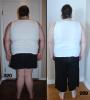
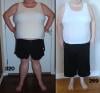
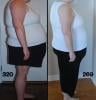
Down 50 pounds! Progress pics.

Finally hit that 50 pound mark this morning! I had my lap band surgery at the end of July. Thought I would share my first set of progress pics. Can you tell a difference? I still have lots to lose, but happy about this start.

(And sorry in advance, not brave enough yet to share full body with face.)

post-148406-0-62469400-1390508769_thumb.jpgpost-148406-0-65619600-1390508770_thumb.jpgpost-148406-0-69062000-1390508771_thumb.jpg

  • Replies 19
  • Views 2.3k
  • Created
  • Last Reply

Featured Replies

Very noticeable difference! Keep on keeping on!

Great work . Keep documenting with pics it will amaze you at how far you have come woo hoo

Good deal!!!

You're doing awesome! Looking good!

Archived

This topic is now archived and is closed to further replies.

Trending Products

PatchAid Vitamin Patches

Account

Navigation

Search

Search

Configure browser push notifications

Chrome (Android)
  1. Tap the lock icon next to the address bar.
  2. Tap Permissions → Notifications.
  3. Adjust your preference.
Chrome (Desktop)
  1. Click the padlock icon in the address bar.
  2. Select Site settings.
  3. Find Notifications and adjust your preference.