Skip to content
View in the app

A better way to browse. Learn more.

BariatricPal

A full-screen app on your home screen with push notifications, badges and more.

To install this app on iOS and iPadOS
  1. Tap the Share icon in Safari
  2. Scroll the menu and tap Add to Home Screen.
  3. Tap Add in the top-right corner.
To install this app on Android
  1. Tap the 3-dot menu (⋮) in the top-right corner of the browser.
  2. Tap Add to Home screen or Install app.
  3. Confirm by tapping Install.

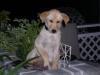
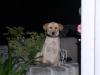
Our new puppy!

  • Replies 5
  • Views 1.1k
  • Created
  • Last Reply

Top Posters In This Topic

Posted Images

Featured Replies

AWWWWWWWWWWWWWWWW... but ya just can't be mad at that cute wittle face! She really is adorable and I hope she gave you a big sllllluuuurrrrp on the face to say sorry!

Darcy

She is adorable!!! I love puppies! Best of luck and hope the damage stays minimal. I know when my welsh corgi was a puppy we lost many shoes, socks and underwear. Thanks for the picture. Teresa

Join the conversation

You can post now and register later. If you have an account, sign in now to post with your account.

Guest
Reply to this topic...

Account

Navigation

Search

Search

Configure browser push notifications

Chrome (Android)
  1. Tap the lock icon next to the address bar.
  2. Tap Permissions → Notifications.
  3. Adjust your preference.
Chrome (Desktop)
  1. Click the padlock icon in the address bar.
  2. Select Site settings.
  3. Find Notifications and adjust your preference.