Skip to content
View in the app

A better way to browse. Learn more.

BariatricPal

A full-screen app on your home screen with push notifications, badges and more.

To install this app on iOS and iPadOS
  1. Tap the Share icon in Safari
  2. Scroll the menu and tap Add to Home Screen.
  3. Tap Add in the top-right corner.
To install this app on Android
  1. Tap the 3-dot menu (⋮) in the top-right corner of the browser.
  2. Tap Add to Home screen or Install app.
  3. Confirm by tapping Install.
  • Appearance

Join BariatricPal free

  • Ask your own questions
  • Reply and follow topics
  • Message other members
  • No cost, no spam

Techie genius required!

Okay, someone buzzed me on a private chat this avo. Now, although the chat is finished, every time I look at a different page, the chat box is popping up again. It is doing my head in as its right in the middle of the screen. Does anyone know of a way to permanently disable this function, without having to close chat EVERY time I move to a different page? I would just like it gone...

Anyone have the magic answer?

Fankooo :) x

  • Replies 7
  • Views 1.2k
  • Created
  • Last Reply

Top Posters In This Topic

Most Popular Posts

  • southernsoul
    southernsoul

    That happens to me sometimes & I don't know how to stop it. It usually stops after awhile, but it's definitely annoying in the meantime. I will anxiously await a better answer!

  • I think there are 2 ways to close the chat room. 1. look for the little square in the lower right had corner of the brower and click on it to hide the chat room or 2. with the chat window open,

  • Madam Reverie
    Madam Reverie

    Thanks for the suggestion, but I tried that and it's still bloody there... Okay, this is doing my head in!!!!! As soon as you leave the page - up it pops again - like some sort of lingering wart.

Posted Images
Featured Replies

That happens to me sometimes & I don't know how to stop it. It usually stops after awhile, but it's definitely annoying in the meantime. I will anxiously await a better answer! :P

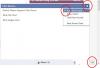
I think there are 2 ways to close the chat room.

1. look for the little square in the lower right had corner of the brower and click on it to hide the chat room

or

2. with the chat window open, click on the little gear in the upper right hand corner, uncheck the "keep room open"

post-46516-13838396125139_thumb.jpg

  • Author

Thanks Joatsaint - I tried and it failed.

Clearly there is a secret way that none of us have fathomed out yet! :ph34r:

How annoying is this though?! Grrrrr.....

I think there are 2 ways to close the chat room.

1. look for the little square in the lower right had corner of the brower and click on it to hide the chat room

or

2. with the chat window open, click on the little gear in the upper right hand corner, uncheck the "keep room open"

post-46516-13838396125139_thumb.jpg

There is another option that says block private chats and then you won't see any messages people send to you privately during a chat session.

There is an icon in the lower right area that says hide chat and you won't see chat when you go to threads on the site.

  • Author

Thanks for the suggestion, but I tried that and it's still bloody there...

Okay, this is doing my head in!!!!!

As soon as you leave the page - up it pops again - like some sort of lingering wart...

I want to find the central 'destroy' button!

I would try shutting down your browser and reopening it. That may solve the problem.

  • Author

Aww, Joatsaint, I tried that too! After my forgetting my password and having to reset it again - I logged back in and up it bleedin' popped!

In a take-off of the Flinstones; instead of shouting 'Wilma', I'm tempted to shout 'ALLLEEEXXXXXXXX!!!!!!'

Join the conversation

You can post as a guest; create a free account to track replies, follow topics, and be part of the largest weight loss surgery community.

Join the conversation

You can post now and register later. If you have an account, sign in now to post with your account.

Guest
Reply to this topic...

Account

Navigation

Search

Search

Configure browser push notifications

Chrome (Android)
  1. Tap the lock icon next to the address bar.
  2. Tap Permissions → Notifications.
  3. Adjust your preference.
Chrome (Desktop)
  1. Click the padlock icon in the address bar.
  2. Select Site settings.
  3. Find Notifications and adjust your preference.