Skip to content
View in the app

A better way to browse. Learn more.

BariatricPal

A full-screen app on your home screen with push notifications, badges and more.

To install this app on iOS and iPadOS
  1. Tap the Share icon in Safari
  2. Scroll the menu and tap Add to Home Screen.
  3. Tap Add in the top-right corner.
To install this app on Android
  1. Tap the 3-dot menu (⋮) in the top-right corner of the browser.
  2. Tap Add to Home screen or Install app.
  3. Confirm by tapping Install.
  • Appearance

Join BariatricPal free

  • Ask your own questions
  • Reply and follow topics
  • Message other members
  • No cost, no spam

Help From Chico Shoppers Needed...

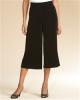
I bought a great pair of Chico brand gaucho pants Friday at the local re-sale shop (see photo below). I don't shop much at Chico's....I'm cheap and they aren't. So I forgot about their peculiar sizing. These pants are a Chico's size 3 and are too big. I want to sell them on e-bay but have no idea what "real" size catagory to put them in. So.....those of you who shop at Chico's, please give me an idea of what a size 3 might equate to.

Edited to add....I will sell them to any LBT member for $7.00 (what I paid) plus postage.

post-204296-13813134544517_thumb.jpg

  • Replies 2
  • Views 730
  • Created
  • Last Reply

Top Posters In This Topic

Posted Images

Featured Replies

Hi Carlene, Chico sizes are a bit vague on purpose as most of thier clothes are stretchy. I have some of their stuff and size 3 is more like a 16-18 at most.

Size one is a combo Small to Med

Size two is a combo of Med to Large

Size three is a combo of Large and X-large.

Its their own idea of making stretchy clothes buyer friendly!

  • Author

Thanks! These are definitely stretchy. In fact, I have seldom seen fabric this stretchy. And I looked at them more carefully after posting and 16-18 sounds about right.

Join the conversation

You can post as a guest; create a free account to track replies, follow topics, and be part of the largest weight loss surgery community.

Join the conversation

You can post now and register later. If you have an account, sign in now to post with your account.

Guest
Reply to this topic...

Account

Navigation

Search

Search

Configure browser push notifications

Chrome (Android)
  1. Tap the lock icon next to the address bar.
  2. Tap Permissions → Notifications.
  3. Adjust your preference.
Chrome (Desktop)
  1. Click the padlock icon in the address bar.
  2. Select Site settings.
  3. Find Notifications and adjust your preference.