Skip to content
View in the app

A better way to browse. Learn more.

BariatricPal

A full-screen app on your home screen with push notifications, badges and more.

To install this app on iOS and iPadOS
  1. Tap the Share icon in Safari
  2. Scroll the menu and tap Add to Home Screen.
  3. Tap Add in the top-right corner.
To install this app on Android
  1. Tap the 3-dot menu (⋮) in the top-right corner of the browser.
  2. Tap Add to Home screen or Install app.
  3. Confirm by tapping Install.

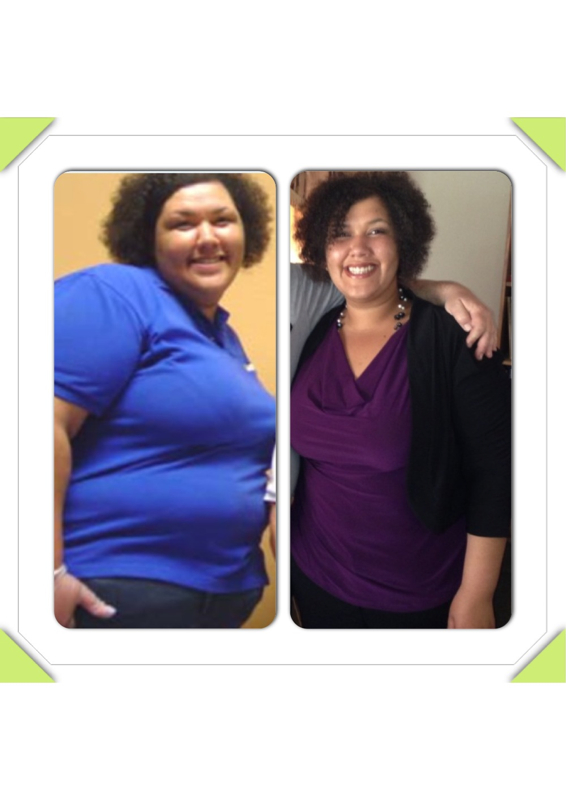
11 weeks out down 65 lbs

post-35214-1381366611866_thumb.jpg

  • Replies 23
  • Views 2.6k
  • Created
  • Last Reply

Featured Replies

What was ur starting weight ?? You are getting me excited. U look fabulous !

  • Author
Awesome! Congrats!!!

Thank you :)

  • Author

What was ur starting weight ?? You are getting me excited. U look fabulous !

I was about 330 in the first pic :(

You look amazing - no wonder you are smiling so big in that 2nd pic! I can't wait to feel that way!

keep up the good work!

beautiful smile! Congrats on the loss.

  • Author
You look amazing - no wonder you are smiling so big in that 2nd pic! I can't wait to feel that way!

keep up the good work!

I hated pics. Still not my favorite past time but it feels good to smile like that again. Do you have a surgery date yet?

  • Author
beautiful smile! Congrats on the loss.

Aww thank you :)

I was about 330 in the first pic :(

My weight now. U look great. It gives me hope. U look fabuloussssas

You look fantabulous! I hope I lose like that in 11 wks

You look great! That's awesome

  • Author

My weight now. U look great. It gives me hope. U look fabuloussssas

Thank you. Do u have a surgery date yet.

  • Author
You look fantabulous! I hope I lose like that in 11 wks

Thanks.

  • Author
You look amazing! Keep up the good work!

Thank u.

Archived

This topic is now archived and is closed to further replies.

Trending Products

PatchAid Vitamin Patches

Account

Navigation

Search

Search

Configure browser push notifications

Chrome (Android)
  1. Tap the lock icon next to the address bar.
  2. Tap Permissions → Notifications.
  3. Adjust your preference.
Chrome (Desktop)
  1. Click the padlock icon in the address bar.
  2. Select Site settings.
  3. Find Notifications and adjust your preference.