




Chicken and Two Bean Chili
- Replies 3
- Views 570
- Created
- Last Reply
Top Posters In This Topic
-
AmandaRaeLeo 2 posts
-
ShariM735 1 post


Popular Days
Most Popular Posts
-
Thanks for sharing. This sounds really good. I will definitely try it! Sent from my iPhone using VST
Posted Images
Featured Replies
Join the conversation
You can post as a guest; create a free account to track replies, follow topics, and be part of the largest weight loss surgery community.
I made this today for the family and stuck a small amount in the Bullet for me. My sleeve was pleased, as was my palette.
1st mix into chili pot, cook and stir:
4 boneless skinless chicken thighs, cut into 1 inch chunks
2 tbls olive oil
1 tbls of Hot Mexican Chili Powder - McCormick
1 tbls of Chipoltle chili pepper, crushed - McCormick
1 tsp crushed red pepper
Salt and pepper to taste
1/2 tbls cumin
1 chopped yellow onion
1 green bell pepper
1 yellow bell pepper
1-2 tbls chopped garlic
1 can Pace's diced tomatoes and green chiles
Add 3 cups of water, stir and simmer for approx 10 minutes.
Then add 15.5 oz can of Bush's reduced sodium black beans and 15.5 oz can of Bush's pinto beans reduced sodium, drained and rinsed.
Add green taco sauce
1 6oz can garlic and oregano tomato paste
Add 1 additional cup of water, if needed.
Simmer until peppers are tender and liquid reduces.
Serves 6
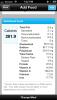
We opted to add a little Kraft Reduced Fat Colby Jack cheese crumbles. I had less than half a serving, but this is the nutritional info for 1 whole serving.