Skip to content
View in the app

A better way to browse. Learn more.

BariatricPal

A full-screen app on your home screen with push notifications, badges and more.

To install this app on iOS and iPadOS
  1. Tap the Share icon in Safari
  2. Scroll the menu and tap Add to Home Screen.
  3. Tap Add in the top-right corner.
To install this app on Android
  1. Tap the 3-dot menu (⋮) in the top-right corner of the browser.
  2. Tap Add to Home screen or Install app.
  3. Confirm by tapping Install.

Pizza!

  • Popular Post

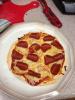
Low carb tortilla with turkey pepperoni tomato sauce and mozzarella. Heat oven 375 use a drop of olive oil to coat backing sheet. Place tortilla and sauce and cheese and pepperoni and cook 10 mins.

post-40715-13813662279449_thumb.jpg

  • Replies 8
  • Views 1k
  • Created
  • Last Reply

Featured Replies

hey .....who says we cant eat pizza !!!! right ?! :) thanks for the idea!

Looks wonderful :)

I've made this before and it's yummy!! The low carb tortilla really does come out a lot like a pizza crust! Even my non wls friends and family love these! I've also made a version with shredded chicken, low sugar bbq sauce and cheddar cheese. Bbq chicken pizza! Yum. The possibilities are endless :)

Looks good! Whats a good portion size for this e.g. 1/4 or 1/2?

I usually cut it in 4 pieces and eat 2-3 slices depending on my hunger level.

  • Author

I only ate half I meant to by the fajita size but got the soft taco size. So next time smaller tortilla

Low carb tortilla with turkey pepperoni tomato sauce and mozzarella. Heat oven 375 use a drop of olive oil to coat backing sheet. Place tortilla and sauce and cheese and pepperoni and cook 10 mins.

How far along are you ? I would so love to eat pizza but I am only 4 weeks post

  • Author

I was sleeved oct 31. So about 2.5 months. I could only eat half.

Archived

This topic is now archived and is closed to further replies.

Trending Products

PatchAid Vitamin Patches

Account

Navigation

Search

Search

Configure browser push notifications

Chrome (Android)
  1. Tap the lock icon next to the address bar.
  2. Tap Permissions → Notifications.
  3. Adjust your preference.
Chrome (Desktop)
  1. Click the padlock icon in the address bar.
  2. Select Site settings.
  3. Find Notifications and adjust your preference.