Skip to content
View in the app

A better way to browse. Learn more.

BariatricPal

A full-screen app on your home screen with push notifications, badges and more.

To install this app on iOS and iPadOS
  1. Tap the Share icon in Safari
  2. Scroll the menu and tap Add to Home Screen.
  3. Tap Add in the top-right corner.
To install this app on Android
  1. Tap the 3-dot menu (⋮) in the top-right corner of the browser.
  2. Tap Add to Home screen or Install app.
  3. Confirm by tapping Install.

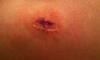
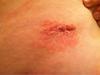
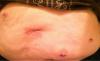
Do My Incisions Look Infected?

My surgery was 9 days ago but my big incision still hurts to the point that I have to take pain medicine. Has anyone else had this problem? Do my incisions look infected, I'm wondering if I should go to the doctor?

post-40160-1381366017788_thumb.jpg

post-40160-1381366017857_thumb.jpg

post-40160-13813660179387_thumb.jpg

  • Replies 8
  • Views 1.1k
  • Created
  • Last Reply

Featured Replies

YES! the doctor that removed mine said mine were infected and they didnt look any where near as bad as that!!! She also stated that the infection looked more as though I was having a reaction to the material used than bacterial .I had to take anti-biotics for 10 more days and used perscription strength topical ointment on them, healed up fine.. you should totally see a doctor

Looks infected to me. Also like some type of allergic reaction.You should get it looked at...ASAP

Best of luck, keep us updated

Time for a trip to the doctor.

Just Do It!!!

To me it looks like more of an allergic reaction to the adhesive from the glue or tape. But it could be an infection, yes. Definitely make an appointment with the doctor. Feel better!

  • Author

Thanks everyone! I went to urgent care today and was told the incisions are irritated. I was given an antibiotic to prevent infection.

Yes...I think they do.....mine never looked like that. You need to see your dr Asap!!

looks like they got wet too soon also soap does that to some people.

Agreed, that redness isn't good. You need to get to the doctor.

Archived

This topic is now archived and is closed to further replies.

Account

Navigation

Search

Search

Configure browser push notifications

Chrome (Android)
  1. Tap the lock icon next to the address bar.
  2. Tap Permissions → Notifications.
  3. Adjust your preference.
Chrome (Desktop)
  1. Click the padlock icon in the address bar.
  2. Select Site settings.
  3. Find Notifications and adjust your preference.