Skip to content
View in the app

A better way to browse. Learn more.

BariatricPal

A full-screen app on your home screen with push notifications, badges and more.

To install this app on iOS and iPadOS
  1. Tap the Share icon in Safari
  2. Scroll the menu and tap Add to Home Screen.
  3. Tap Add in the top-right corner.
To install this app on Android
  1. Tap the 3-dot menu (⋮) in the top-right corner of the browser.
  2. Tap Add to Home screen or Install app.
  3. Confirm by tapping Install.

The Crazy Maker

Just a reminder: Those ups and downs on the scale are often just normal body behavior. Don't let it get you down people!

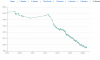
Here is my daily weigh in for the last 6 weeks....As I sometimes have to remind myself daily, the scale is going down monthly!

post-3718-13813656816407_thumb.png

  • Replies 5
  • Views 1.3k
  • Created
  • Last Reply

Top Posters In This Topic

Posted Images

Featured Replies

I am loving that graph... it is a very visual image of your success... congrats on a downward trend!

Just one question... how did you do that???!!

  • Author

I am loving that graph... it is a very visual image of your success... congrats on a downward trend!

Just one question... how did you do that???!!

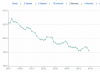
HI Coops! I use Fitday.com, and they let you view your progress on a graph in about 8 time frames. If you input your weight daily, you get something like my graph. It helps me see the overview, and not freak out so much on the daily ups and downs. You go to Weight, then My weigh reports then choose a time frame from one week to 12 months. The view I used for that graph was 8 weeks.

  • Author

Here is the 12 month one which shows months before I got the surgery... you can tell when that happened!

post-3718-13813656816662_thumb.png

Wow, that is cool! I log on caloriecount.about.com but I don't see how I can copy and paste my graph in here. I don't put my weight down in there everyday though...that would have been cool to see.

  • Author

Wow, that is cool! I log on caloriecount.about.com but I don't see how I can copy and paste my graph in here. I don't put my weight down in there everyday though...that would have been cool to see.

I take a screen shot of it to my desktop, then upload as an image to the post.

Join the conversation

You can post now and register later. If you have an account, sign in now to post with your account.

Guest
Reply to this topic...

Trending Products

PatchAid Vitamin Patches

Account

Navigation

Search

Search

Configure browser push notifications

Chrome (Android)
  1. Tap the lock icon next to the address bar.
  2. Tap Permissions → Notifications.
  3. Adjust your preference.
Chrome (Desktop)
  1. Click the padlock icon in the address bar.
  2. Select Site settings.
  3. Find Notifications and adjust your preference.