DanielleDunlap
Pre Op
-
Joined
-
Last visited
Everything posted by DanielleDunlap
-
Tomorrow is surgery day! I'm super nervous and excited all at once. I almost had to postpone as my hubby has covid but my test came back negative and the surgeon said he's not concerned since I'm vaccinated. Have to be to the hospital at 5:15am wish me luck! Happy new year to you all and many blessings ?
-
Oh wow yours is strictly liquid! I was told no slimfast because it has too much sugar in it. Good luck with you diet and surgery! I'm sure you will be able to get through it!
-
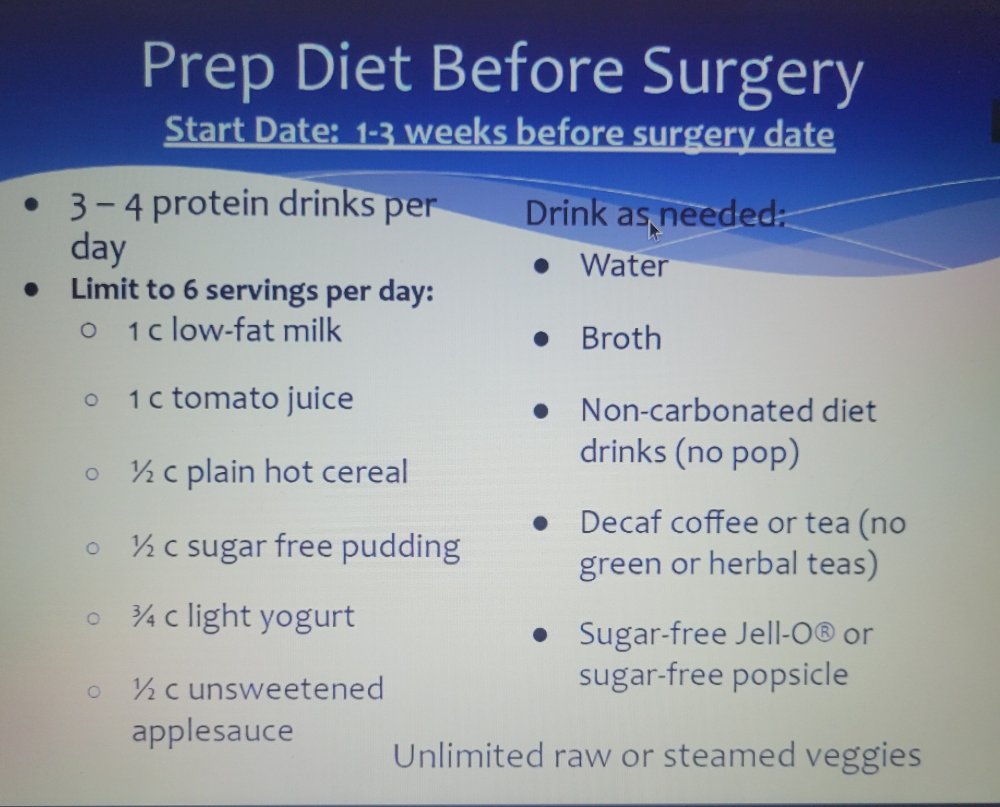
I'm really curious what's on the menu for everyone's prep diet mine is....
-
Good luck!!
-
Good luck!
-
Worst feeling ever! Cooking Christmas breakfast and dinner that you cannot eat!! ?
-
I'm Jan 12th too! Super excited but nervous too. Started my preop diet on Monday and this is so hard during the holidays