jack morris 122716
Pre Op
-
Joined
-
Last visited
Everything posted by jack morris 122716
-
Good to no little bill Sent from my iPhone using the BariatricPal App
-
As long as your not in pain should be fine don't over do it I'm 2days out and I'm a little faster to get them down doc said just pace your self Sent from my iPhone using the BariatricPal App
-
Well day two done took all day to get my shack down but I did it got Water in and started 2nd shack slow go but I'll get there Sent from my iPhone using the BariatricPal App
-
Lol my dad is jack to to cool Sent from my iPhone using the BariatricPal App
-
Thanks for the words encouragement I just started the group thing and so far it's been a help Sent from my iPhone using the BariatricPal App
-
Good to here I asked about the hiccups and no answers so it not just me in the long run I feel awesome Sent from my iPhone using the BariatricPal App
-
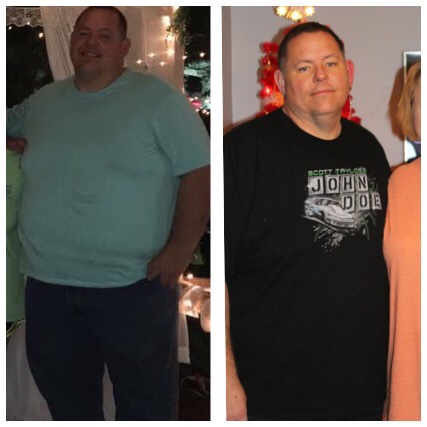
its been hard but I dropped 80 lbs before my surgery and have 140 to go. hard work does pay off! I started my journey in April of 2016 life has changed for me. Sent from my iPhone using the BariatricPal App

-
I had mine done on 12/27/16 in Mississippi so far not to bad have the hiccups and some pain but over all not as bad as I thought Sent from my iPhone using the BariatricPal App