Skip to content
View in the app

A better way to browse. Learn more.

BariatricPal

A full-screen app on your home screen with push notifications, badges and more.

To install this app on iOS and iPadOS
  1. Tap the Share icon in Safari
  2. Scroll the menu and tap Add to Home Screen.
  3. Tap Add in the top-right corner.
To install this app on Android
  1. Tap the 3-dot menu (⋮) in the top-right corner of the browser.
  2. Tap Add to Home screen or Install app.
  3. Confirm by tapping Install.
  • Appearance

Join BariatricPal free

  • Ask your own questions
  • Reply and follow topics
  • Message other members
  • No cost, no spam

50yearoldme

Gastric Sleeve Patients
  • Joined

  • Last visited

Everything posted by 50yearoldme

  1. I'm waiting on my date for January or early February! I am a long term anti depressant patient. Will I still be able to take my meds after surgery? I'm worried about trying to get off of them...
  2. I quit smoking in 1999! But I started chewing trident and chew it every time I frive or I'm bored. Why is it that you can't chew gum? Also If you were a gum chewer too, what do you do now?
  3. https://www.youtube.com/channel/UC9ywgVpRdR9ezoi_-roiaqQ
  4. Just want to share my YouTube page. I'll be videoing my journey, and here is a link to my first video
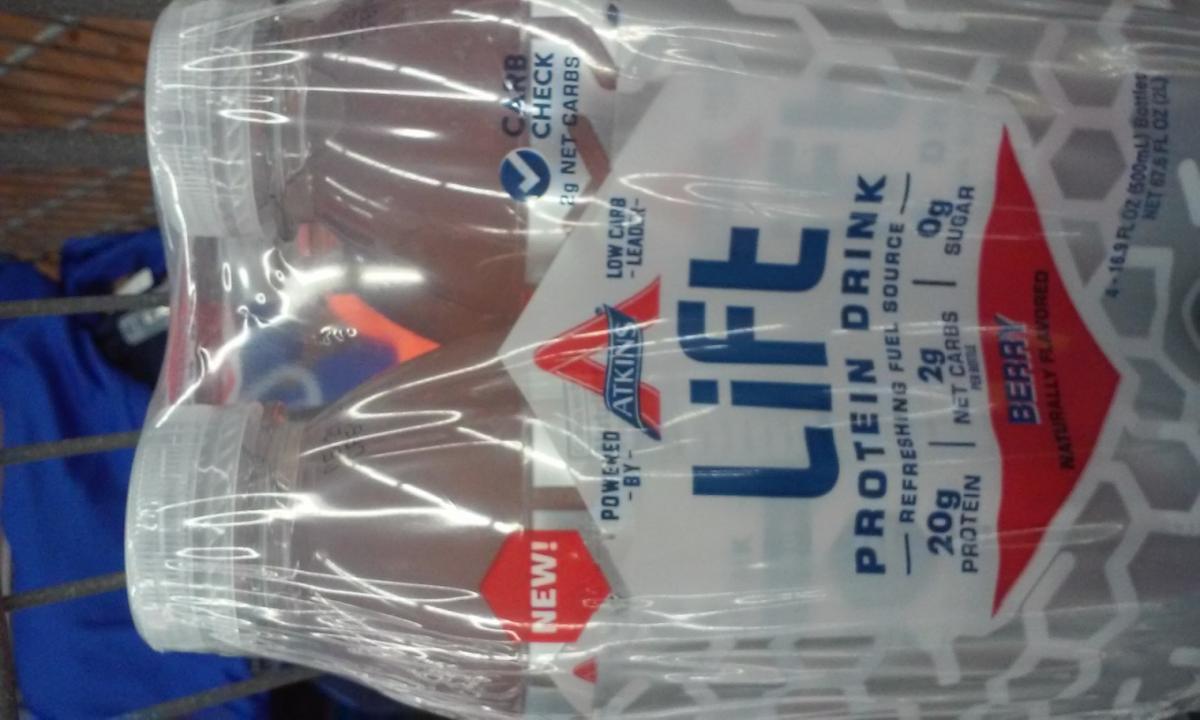
  5. I found this today at Walmart. Has anyone used this on the clear pre/post diet? Would you recommend it?
Account

Navigation

Search

Search

Configure browser push notifications

Chrome (Android)
  1. Tap the lock icon next to the address bar.
  2. Tap Permissions → Notifications.
  3. Adjust your preference.
Chrome (Desktop)
  1. Click the padlock icon in the address bar.
  2. Select Site settings.
  3. Find Notifications and adjust your preference.