Skip to content
View in the app

A better way to browse. Learn more.

BariatricPal

A full-screen app on your home screen with push notifications, badges and more.

To install this app on iOS and iPadOS
  1. Tap the Share icon in Safari
  2. Scroll the menu and tap Add to Home Screen.
  3. Tap Add in the top-right corner.
To install this app on Android
  1. Tap the 3-dot menu (⋮) in the top-right corner of the browser.
  2. Tap Add to Home screen or Install app.
  3. Confirm by tapping Install.
  • Appearance

Join BariatricPal free

  • Ask your own questions
  • Reply and follow topics
  • Message other members
  • No cost, no spam

karendoyle

Pre Op
  • Joined

  • Last visited

Everything posted by karendoyle

  1. Im 8 yrs out and im still freezing cold. I even wear socks to bed. And summer time i love but after having heat index here of 113..i was still cold. Sent from my SM-G900R4 using the BariatricPal App
  2. I dont have a computer..or believe me i would. I live in the country and dont get internet service. Sent from my SM-G900R4 using the BariatricPal App
  3. Oh..and im 50 Sent from my SM-G900R4 using the BariatricPal App
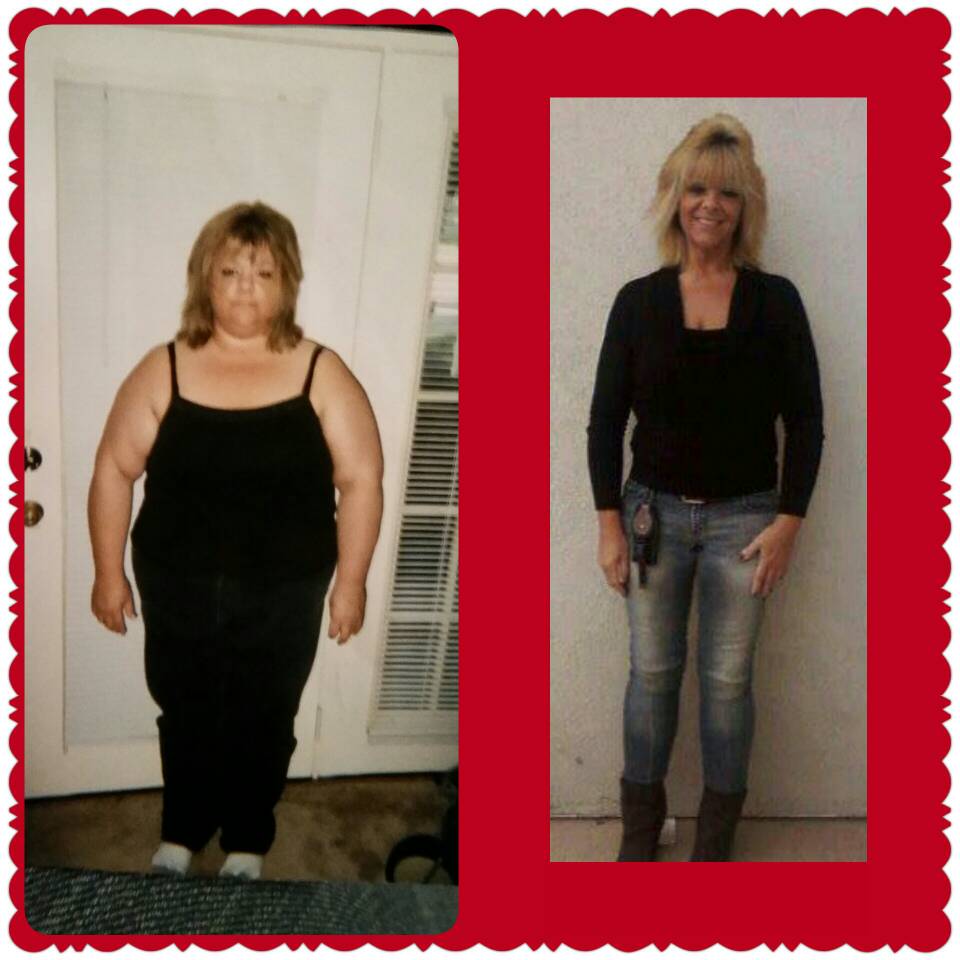
  4. Hi..im a newbie here. Trying to figure out how this app works. I had gastric 8 yrs ago..lost 160 lbs first year..been maintaining. Use to exercise A LOT but moving to a small town 5 yrs ago pushed me back because i dont know anyone here and no support/buddy system. Heres a before and after pic Sent from my SM-G900R4 using the BariatricPal App

Account

Navigation

Search

Search

Configure browser push notifications

Chrome (Android)
  1. Tap the lock icon next to the address bar.
  2. Tap Permissions → Notifications.
  3. Adjust your preference.
Chrome (Desktop)
  1. Click the padlock icon in the address bar.
  2. Select Site settings.
  3. Find Notifications and adjust your preference.