readyforthislifechange
Pre Op
-
Joined
-
Last visited
-
 readyforthislifechange reacted to a post in a topic:
What do you see in the mirror after losing a substantial amount of weight?
readyforthislifechange reacted to a post in a topic:
What do you see in the mirror after losing a substantial amount of weight?
-
-
-
-
-
-
-
-
-
-
-
-
Reading your post brought back soo many memories but I had to smile and say all those feelings are so worth it once you get through it. I am 8 months post op and it was rough all the way up until 8 weeks post op and to be honest the eating started becoming painless very recently. Maybe in the last two months. I do agree with others, the hormones at that stage are out of control and the fact that you now don't have food as a comfort anymore was such a reality check. You have to relearn everything and build an entire new relationship to food. But if I can give you any advice is to not look to your friend or anyone for your own journey. If you take your Vitamins and Protein to the best of your ability you don't know what result you will have. Your success is not built on someone else's. The fact that you've made it to be one of the post op people gives you opportunity to build a new entirely different life. I know most people in this forum are soo happy including myself. Being down 95lbs is not even the thing I'm most happy about when I look in the mirror and see my results from sculpting my new body with the tool I have been given, a second chance, I could cry all over again. And that feeling alone is sooo worth it! In a few months you're going to look back and you're going to laugh and hopefully have formed a new relationship to food and found a multitude of others things you now enjoy instead of eating your "favorite foods"....feel better! Sent from my SM-N920V using the BariatricPal App
-
-
-
-
Oh man I'm sorry you're going through this. I have been pushed away by the same people that are on your thread screaming they're the bariatric police. Geez can't believe they are still on here telling others how to do things right. Very sad. Obviously you are well aware of your issues. The purpose of this site is to help those when they're down and empower them to do better or sometimes even understand where their possible issue could be. Believe it or not people, some individuals are different from yourself, so maybe, just maybe we can allow them to be human and help them overcome their fear and not make them feel guilty. Obesity is a recognized disease and if it was easily cured then we all wouldn't be on here. Some of you have to step outside yourselves and really see that were all here to help others and ourselves, not to judge and make them feel better. I went to my bariatric support group today where several people mentioned having left this site because of this sort of response. HushxPuppyx I hope you will get back on track. The mental part of this journey is much harder than the physical part and I agree with Bellabloom. Maybe trying to reset your cravings and pouch might help. Or if you are able to incorporate exercise on a more vigorous level to where you'd need a few more calories but even then try to keep them primarily Protein. I wish you the best or luck and ignore the bariatric police, these group of hags are too perfect to be on such a humanly site lol
-
-
-
-
-
-
Classy.I've been following the sleeve threads for a few months now and noticed that YOU seem to have a problem with most people on this forum and only respond in a condescending tone, while ignoring the question asked. Again, my question was asking what size bougie you have. If you don't care about what I'm asking, why did you respond? I don't get it. You comment on so many threads that I read with irrelevant eye-rolling responses or you're either attacking someone in each thread. Just like you're doing now. Omg I am so glad you pointed this out! I noticed it's always the same people with the same attitude that feel as if they need to comment their useless opinion on things that apparently don't even concern them. I don't get it?! ASUgrad posted a legit question, like most of us she has her concerns about her journey. And all of you, with the a*****e mentality, of forcing your journey on others with this condescending tone should just keep your words to yourself if you can't provide any type of real support. I have noticed a lot of people leaving the forums and being too scared to even express themselves, out of fear of being bullied or judged on the question they might have. Honestly you all should be ashamed! This is a public forum and judgement free zone. Everyone's journey is their own and how dare you sit here and pretend your better than everyone else, simply by utilizing what works for you. I used to seek comfort in these threads and support until I saw it's always the same assholes posting a ridiculous amount of their own personal journey, totally bullying others to the point that most threads seem to be having the same few people. Yes we know you did it, you had VSG and now you're the fuckin expert. Now please sit down and allow others to please share their fears without fear of retaliation. I thought this was a super interesting question and am following this thread and am thankful you asked this question! Huh. What I've noticed is that most veterans leave because they are spoken down to by "newbies" who don't appreciate the voice of experience, "newbies" who get upset if they don't get coddled and catered to. Most vets don't NEED to be here but choose to be in order to pay it forward. I've lost my weight. I've not only maintained my weight loss for over a year and a half, but I've learned what I need to do for a lifetime. I could stay in the vet's forum for support, or I could offer words to people who are pre-op and newly post-op just as vets before me did for me. I have no problem with the question, just as I have no problem with the replies until people start getting attacked because they didn't answer exactly "right". Name calling is NEVER ok and it's bizarre to me that the person calling "bully" is also throwing out words like "a*****e" and "fuckin expert". (Classy, right?) Yes. This discussion is important and it is relevant, I agree. I don't think it would be nearly as informative and educational, though, if everyone simply answered with a number. You would be one to answer to my response as you are one of those many "veterans" that have shamed "newbies" . And fyi some of the people you're referring to as "veterans" are not even a year out. I am 2 months post op, am I considered "veteran"? I do know that I will be on this site a very long time to answer questions that need actual support that might require me to have an open mind.
-
Classy. I've been following the sleeve threads for a few months now and noticed that YOU seem to have a problem with most people on this forum and only respond in a condescending tone, while ignoring the question asked. Again, my question was asking what size bougie you have. If you don't care about what I'm asking, why did you respond? I don't get it. You comment on so many threads that I read with irrelevant eye-rolling responses or you're either attacking someone in each thread. Just like you're doing now. Omg I am so glad you pointed this out! I noticed it's always the same people with the same attitude that feel as if they need to comment their useless opinion on things that apparently don't even concern them. I don't get it?! ASUgrad posted a legit question, like most of us she has her concerns about her journey. And all of you, with the asshole mentality, of forcing your journey on others with this condescending tone should just keep your words to yourself if you can't provide any type of real support. I have noticed a lot of people leaving the forums and being too scared to even express themselves, out of fear of being bullied or judged on the question they might have. Honestly you all should be ashamed! This is a public forum and judgement free zone. Everyone's journey is their own and how dare you sit here and pretend your better than everyone else, simply by utilizing what works for you. I used to seek comfort in these threads and support until I saw it's always the same assholes posting a ridiculous amount of their own personal journey, totally bullying others to the point that most threads seem to be having the same few people. Yes we know you did it, you had VSG and now you're the fuckin expert. Now please sit down and allow others to please share their fears without fear of retaliation. I thought this was a super interesting question and am following this thread and am thankful you asked this question!
-
Thank you very much for your kind words. I was kind of bummed by the extent negative was portrayed. I understand this is not for everyone but I didn't think I woukd scrutinized. I have been on this forum for months before I had my surgery and never came across a thread where people were so mean in sharing their opposite views. I don't get it. I didn't mean any harm at all. It did kinda hurt since this group of people are the only ones I know I can actually relate to. But oh well I guess that's life. I definitely appreciate postive comments such as yours. Does make me feel alot better.
-
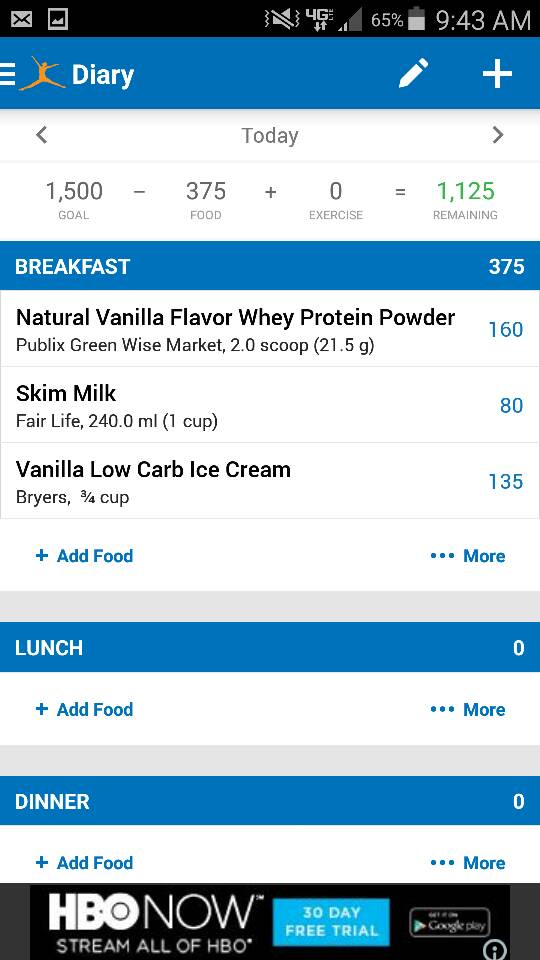
Thank you! I guess maybe my approach to this was wrong and I should have said. An occasional low carb milkshake. I mean it's not actual ice cream. To me it's the same as substituting low carb tortillas as a possible pizza base. ( which I am not doing at this stage). I am not encouraging others to drink this everyday. If you really look at it and write down the calories this is a good substitution. To me ice cream was also not a trigger food, it's something I rarely every eat or have cravings for. So I really am just sharing a personal experience and it worked for me. I am not drinking this everyday but I have made it as an afternoon Meal Replacement twice now to take to the pool in 95° weather, to lounge around. I am following my diet super strictly and am not allowed many other things I see other people eating this soon and to be honest feel absolutely amazing. I have lost 30 lbs in now almost 4 weeks and dropped a dress size and feel like I'm a new person already. We really all have our own journey. I am not looking to get scrutinized over this or tell anyone to make this everyday.
-
Congratulations on all your success. I am certain it was hard. I am also quite certain I will reach mine as well. I am not telling everyone to do this, I had my share of struggles with the shakes that made me sick and uncomfortable and I was simply trying something new with permission and still dribking my regular morning shakes. But I think the confusion here is were calling it "ice cream" and yes although it is ice cream it is low carb, less calories and even fiber. I have given up lots of things with this journey and am simply learning new ways just like I'm sure you did. This "milkshake" is not a reward or a cheat meal. And calling my NUT an idiot just because this doesn't work for you is quite rude. I don't understand the negativity in this post. If this doesn't work for you or you don't want this in your life why do you have to ruin it for others. That's just insane. I am well within my calorie goals for the day and we'll below my carb goal. Just because this isn't for you doesn't mean someone else might not want to try it with permission of their NUT after everything is evaluated. Why sit here and judge me because of your struggles. I have my own thank you very much and quite frankly I would appreciate if I would get the same respect you show others on here for simply sharing an idea. Geez.
-
The best of luck with your surgery! And thank you for your kind words ????
-
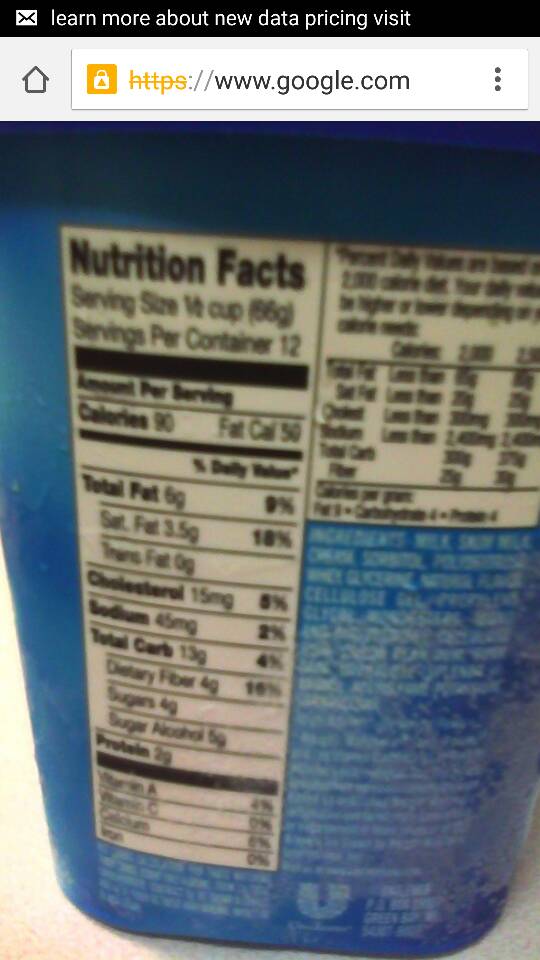
Again everyone is entitled to their own opinion. But my nutritionist looked at the ingredients of the ice cream which I posted and was fine with it. I don't drink this everyday but it's a very low carb ice cream that once it's mixed with Protein and fat free protein milk is not too thick and just a tasty alternative. If you can't drink it, don't want to drink it, don't like the temptation of it then of course no one is forcing it. Some people were not even aware that ice cream existed and like so many I just wanted to share a postive experience I had encountered and still lost weight for the week. Adding ice is something that I tried and it didn't work. The protein taste was still very strong but of course, but I have added a sugar free popsicle to a Syntrax nectar shake and it was pretty tasty. We all have our own journey and are entitled to our opinions, I did not expect to get judged for mentioning the word "ice cream" it was a healthy alternative to regular ice cream and if you want to modify it make it your own. You could make a shake under 200 calories. I posted the ingredients just to share what worked for me under my nutritional guidelines, which I have been following to the book and I feel absolutely amazing and so thankful. Thing is we will have cravings occasionally. I could have gone to mcds and ordered a milkshake with 80g sugar and added in a scoop of protein mix but instead I researched the low carb sugar free option brought it to my nutritionist and she thought it was a great idea. Idk to me that's a pretty solid victory. And when summer comes next year I will be prepared and know what works for me.
-
Thank you! ????
-
As I stated, too high for me. Never said anything about you. Again said you were entitled but made a suggestion to help others not so inclined to research. Just stating facts not trying to be rude, seems you are a bit defensive and if I hurt your sensitivities I am sorry. I still stand by my statement that 375 as you say, 400 as I added is to much for one shake. A 12 oz McDonalds vanilla shake is : Calories 520 Total Fat 17g 26% Carbs 80g 27% Protein 12g Sodium 260mg 11% So other than the obvious nutrient differences, the calories are not really all that much of a savings or bang for the buck so to speak. Just keeping it real! Wow that's nuts. You're telling me there is not much difference. How many grams of sugar are in the McDonald's milkshake? Geez you need to chill out..I posted everything I didn't hide anything or try to sell anything. Look it up on my fitness pal when you enter it. The shake I mentioned had nutritional including fiber which most of us seem to not get. I'm not sensitive you came on this post with a negative attitude not even realizing that this is a healthy alternative. If you think a meal that has 375 calories a lot you're just plain crazy. It had tons of protein, very little sugar and fiber. Quite the opposite of a McDonald's shake. Again if it doesn't work for you just don't drink it. No one cares. It might work for someone else negative Nancy maybe you can sign yourself up to be the bariatric police. Seriously.
-
No need to be rude about it. I mean I wasn't trying to harm anyone. I was extremely excited and like you said in other forums everyone's nutritional plan is different. This is approved by my nutritionist she is super happy I found something that worked and even brought it up in the support group. I wasn't trying to hide anything just offer a suggestion like so many of us. Maybe I went about it the wrong way but just because it doesn't work for you doesn't mean it might not work for others. Geez kinda disappointing to get such a negative reaction to something intended to be innocent. Just because this is not for you doesn't mean you have to bash it. Like I said you can modify it. Maybe one scoop of protein mix and just one serving of ice cream and half a cup of the fat free milk. That would change a lot. We all have to find a way to live with the life changes and this one works well for me so I just wanted to share it. No need to be rude about it. I mean I wasn't trying to harm anyone. I was extremely excited and like you said in other forums everyone's nutritional plan is different. This is approved by my nutritionist she is super happy I found something that worked and even brought it up in the support group. I wasn't trying to hide anything just offer a suggestion like so many of us. Maybe I went about it the wrong way but just because it doesn't work for you doesn't mean it might not work for others. Geez kinda disappointing to get such a negative reaction to something intended to be innocent. Just because this is not for you doesn't mean you have to bash it. Like I said you can modify it. Maybe one scoop of protein mix and just one serving of ice cream and half a cup of the fat free milk. That would change a lot. We all have to find a way to live with the life changes and this one works well for me so I just wanted to share it.
-
The fairlife milk is lactose free and to be honest only being 3 weeks post op it's hard to even reach 800 calories. This is just a meal replacement. And im my opinion a pretty good one
-
Still under 400 calories....like I said just an alternative.

-
When counting carbs you subtract the sugar alcohols and the Fiber from the total carbs listed on the serving. And the fairlife skim milk is 80 calories 13g Protein and 6g carbs. And the whey protein only has 3 g carb per serving. Or course you could modify this as you choose. And only use one scoop. What I am trying to say is that adding even just a half of scoop and putting it in a blender takes away from the whey protein taste and offers an alternative. My mini meals never add up to more than maybe 200 calories so for Breakfast this is for me a great alternative. I still want to aim to get at least 800 calories a day as I'm not looking for a super fast weight loss..I have done competitive weight training in the past and am desperate to not lose muscle mass. So this is just a guide for those who are struggling. But all in all its still under 400 calories.