crissylynn82
Gastric Sleeve Patients
-
Joined
-
Last visited
-
-
-
-
-
-
-
-
-
-
-
-
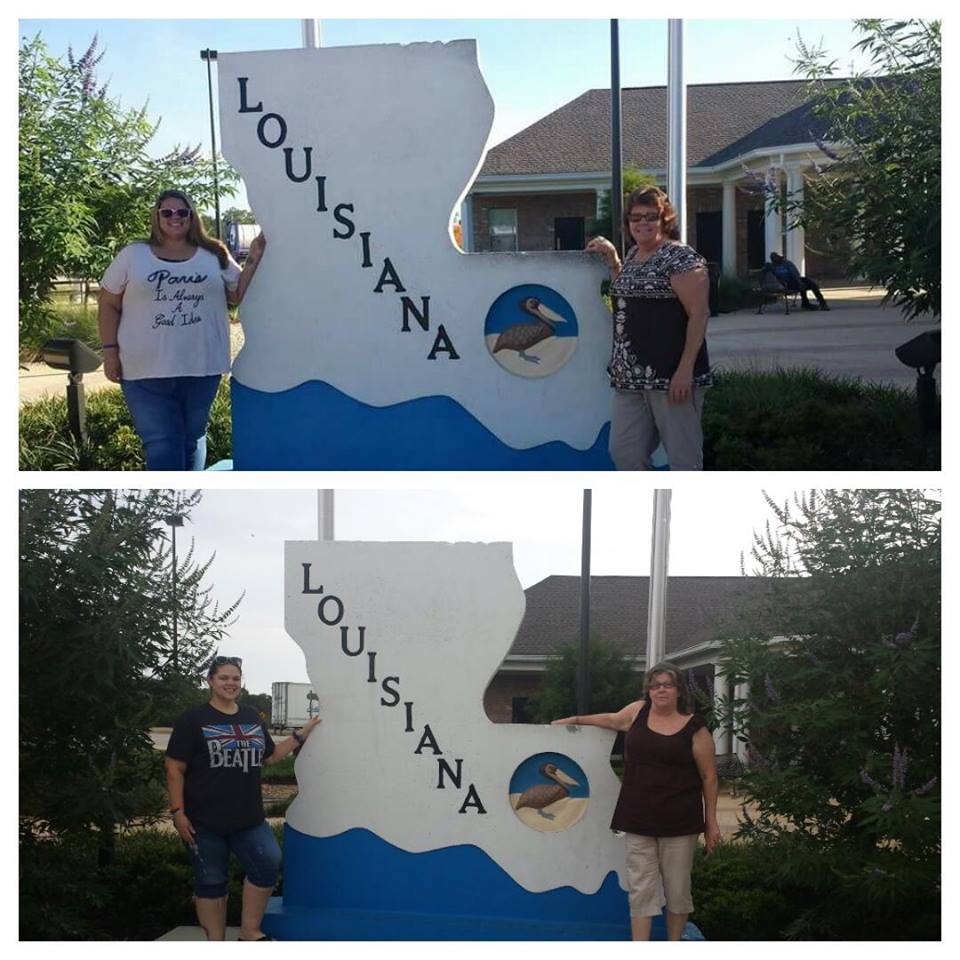
Down 130 pounds so far. The top picture is of me in September 2014 and the bottom one is September 2015. Both taken on my way to New Orleans for a cruise. Still need to loose about 60 more pounds but I will hopefully be there soon!
-
Hello everyone, I am currently down 130 pounds since my surgery in January. I lost 100 pounds pretty quickly (like in the first few months) and the rest is slowly coming off (lost about 30 pounds from mid May to mid September). But now my weight loss has literally just stopped! I have not lost any weight in about 2 months. I still weigh 238 pounds. I still have a lot more weight to lose!! I am eating a little more now than I could when I first had surgery. But I still eat A LOT less than I did before. I do eat some carbs but they are complex carbs. Sweet potatoes, 100% whole wheat, oatmeal. Stuff like that. But I was told it was okay to incorporate that stuff back in as long as you avoided the simple carbs. I also exercise A LOT. Like 2 or 3 times a day. I have been obsessed with trying to get off of this plateau but nothing seems to be working. Any advice would be helpful!! I am so frustrated right now!
-
I am a little over 4 months post op. I am down about 88 pounds so far. Which is good but my problem is I haven't lost anything in about 2 weeks. Which is crazy to me because I have increased my exercise. I usually eat around 800 calories a day. Mostly protein. What can I do to get off of this plateau? Any advice would be appreciated.
-
Hi everyone. I am home now and completely miserable. I know my body has been through hell and back but I didn't think I would feel this awful. I have zero energy and my body hurts all over. All I want to do is lay down but if I lay for to long my legs start cramping. If I sit up for to long my back starts hurting. I seem to stay nauseous. I can't handle anything on my stomach but a little bit of water. This has me so depressed. I just lay here and cry. Which gets me chocked up and I throw up what little water I have in my stomach. Please tell me it will get better. I don't want to end up back in the hospital but I feel that is where I am headed. I feel so alone, helpless, and scared.
-
I had my surgery with Dr. McDowell in Nashville. He has been a great doctor. It looks promising for me to be getting out of here on Friday. I sure hope so.
-
Thanks everyone! I am back in a regular room. Looks like I will be here until Friday at least. Dr is still giving my stomach rest in hopes I won't have to have another surgery. So it is just a wait and see game now.
-
I just had a PICC line put in. It is so much better than the IVS. I had an IV in each arm since they were giving me so many antibiotics and fluids.
-
I actually was moved to the ICU last night. I was in sepsis from the leak. It has become very dangerous now.
-
So I started running 104.5 fever last night. My husband rushed me to the ER. Turns out I have a small leak. They have me on full IV liquids and strong antibiotics. Dr is hoping that will cure it. If not it's back to surgery. I knew something wasn't right. I have felt awful all week I hate this!
-
Thank you everyone for the advice and kind words.
-
I am 3 weeks post op and have the exact same problem. I have found 1 thing that doesn't make me feel sick. KFC mashed potatoes and gravy. Probably not one of the healthier options but it does kill me when I try to eat it.
-
Mine gurgles all day long.
-
I don't have food regrets. I still don't want to eat much. I just feel extremely sluggish, shakey, and weak. And I am still having some horrible gas pains. I am just so uncomfortable.
-
I am 2 1/2 weeks post op and I am not entirely sure I made the right decision. It has just been a rough road. Tomorrow is my birthday and all I want to do is stay in bed. This has been so hard.
-
I am the same way! The multivitamin makes me so sick. I am going to try putting them in my protein shakes I make.