loriannfos
Pre Op
-
Joined
-
Last visited
-
-
-
-
-
-
-
Hello all! Sleeve date 12/31/13 - weighed 210. Now at 144. I ran 8 mi yesterday and I'm training for a half marathon. Woot woot!
-
-
Congrats Fiddleman! I am happy with my March. On Sunday I ran/walked 7.25 miles in 1h, 20 min. And more importantly, I am still able to walk today ! LOL
-
-
-
-
With all due respect to your surgeon, I disagree with his opinion and I think you should seek a second opinion - this is from my perspective of being both a doctor (family Medicine) and a gastric sleeve patient. There's no reason you can't switch your post-op follow up to a different Bariatric surgeon. You are meeting your weight loss and protein goals, you are for the most part avoiding refined carbs, so I don't see a problem. Congrats to you for your success thus far! You're doing great!!
-
-
-
-
Hi folks, I've been doing some research on various Protein formulations, whey vs soy vs casein vs whey protein isolate ... I have read that whey protein isolate has the highest bioavailability among the different subtypes. It is also on the higher end of the price range. I think the Premier Protein ready-made shakes (a mix of whey and soy Proteins , I believe) are quite tasty, actually tastier than the more expensive 'Oh Yeah!' whey protein isolate shakes (except strawberry - oh yeah ready mix is the tastier ) I wonder about the bioavailability of Premier Protein ... Eg what percentage of the protein delivered is the gut able to absorb? I haven't been able to find any stats on this. Any input would be greatly appreciated! :-). Thanks and best wishes to all in your weight loss journeys! Yours Truly, A Protein Geek :-)
-
-
-
For folks in South Carolina, on DirecTV, it is at 10 PM on 'eTV' - ch. 29. 'Independent Lens'.
-
Good job Fiddleman, you are a P90x Beast! :-) I am training for a 10K, using the '10K Runner' app. Today finished week 4 of 14 - now up to running 18 min per workout - go, me ! I am circuit training with a personal trainer at the Y for 1 hour twice a week as well. My goal for March is to log a total 6 hours per week for training, and to run a mile nonstop by end of month. Thanks for all the inspiring and motivating posts!
-
-
-
-
-
-
Hi y'all - just checking in, too, w/my 12/2013 'peeps'. HW 210, SW 199, CW 158, total loss 52#! Everything in day-to-day activities seems easier now... Makes sense, now that I'm no longer lugging around the equivalent of a 5-gal Water jug all day long! Nutrition remains a bit of a struggle ... No hunger so I have to set reminders to eat! Lol, never thought I'd say That ! I rely on whey Protein isolate shakes (1-2 a day) when I'm falling short of my 70g daily goal. I carry a water bottle (stainless steel, double (vacuum) wall) at all times. I like my water icy-cold only. Wishing everyone well! Happy Spring (and happy new 'you'!)
-
My favorite protein shake (powder) is Unjury. It is high quality whey protein isolate - which is well absorbed by the gut - and tastes great.
-
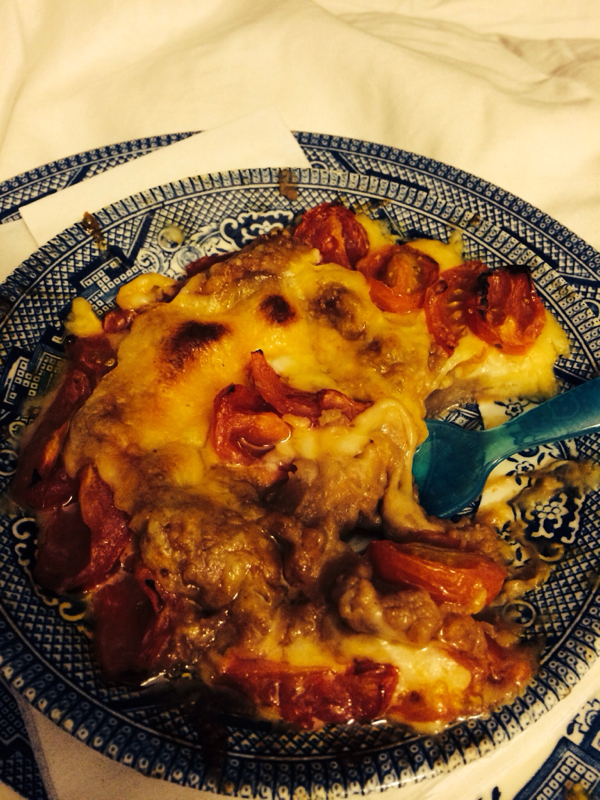
Update for Loriannfos: VSG date 12/31/13 Highest Weight 210 Starting Weight 201 Current Weight 164 --46 lbs lighter!!! -- Livin' and Lovin' the sleeve plan! I'm enjoying a healthy snack tonight... 1/4 c fat-free Refried Beans Topped w/ 1/4 c shredded Colby-Jack cheese And I added about 6 grape tomatoes (quartered, lightly brushed with Lucini olive oil) Added a pinch of Kosher salt Stuck plate under broiler for about 5 min... Delish!

-
Thanks for the excellent information! It has been a wild ride for me thus far. But a successful one: down 46# I am so glad I established a therapist prior to my surgery. The monthly appointments ensure that I 'Check in' on how I am doing emotionally.
-
Great metaphor! I thought of it today while at a lunch meeting. A colleague seated across from me was eating French Fries (my Achilles heel). I was feeling sad, deprived... But then a thought popped into my mind, 'I am stronger than a French Fry '. Within an instant the negative thoughts were replaced with a sense of calm, Zen-like centeredness. To quote a popular 80s song, "What a Feeling!" Thank you for sharing such a wonderful way to reframe a negative "cannot have, self-deprive" into a positive "I am strong, I have a choice, I am empowered" . Kudos!!!
-
ME TOO! Happened this past Sun night... my friend instantly high fived me . Congrats!!!
-
I was sleeved 12/31/13. New year, new stomach, new me!!! Thus far I've lost 45#. Have 35# left to go. Feels weird to be looking in the mirror and feeling pride rather than disgust at what I see. I am still on soft foods diet. I am craving Thai food something fierce, but I'm leery, as I just can't seem to tolerate spicy foods since surgery. That's a toughie for this Cajun girl raised on good ole N'Awlins Louisiana cooking! (Sigh)
-
I have struggled with constipation as well. I've upped my Colace (OTC stool softener) to 100 mg twice a day. I try to work fat free Refried beans into my diet, 1/4 c daily, that helps. My doc lets me use Miralax as needed (OTC too, but not good for folks with kidney issues so check w/doc first ).
-
I am much colder than I used to be before surgery. I am 8 weeks s/p vertical sleeve gastrectomy.