Chris_R
Gastric Sleeve Patients
-
Joined
-
Last visited
Everything posted by Chris_R
-
I was told monthly until I tell them to stop. I can't figure out how to get the link to load, sorry. I tried
-
www.insurenutrition.com
-
I have Independence Blue Cross and Caremark prescription coverage.
-
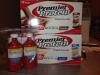
This is what you get when approved (by your insurance).
-
Im on full liquids 2weeks preop, now on day 6. My diet includes things like yogurt and cream of wheat, but I'm needing something savory. Any suggestions?
-
http://www.bariatricchoice.com/?gclid=COWk8P3Eq7oCFYqi4Aodt10AqQ
-
I am getting sleeved on 11/21. On the advice of another sleever on a different board, I went to www.insurenutrition.com. You fill out a form with insurance info and they do the leg work. I was approved and monthly will get protein shakes and vitamins. For anyone getting any type of bariatric procedure, definitely check their site out. I am so glad I did.
-
I do transcription from home 4 hours a day. The nurse told me to see how I feel. I get done 11/21, Thursday and am off until Tuesday. I'm hoping to be able to resume my normal shift.
-
I have my surgery 11/21. I'm allowed full liquids, so the 2 weeks haven't been too bad. I've thought of throwing in the towel twice already, but won't. I keep thinking I'll never be able to have anything ever again.