





Krystal7k
Gastric Bypass Patients
-
Joined
-
Last visited
Everything posted by Krystal7k
-
[ATTACH]3839[/ATTACH] [ATTACH]3840[/ATTACH] From this to that

-
I went back to work today again my residents were shocked how I looked it made me feel good
-
My large is getting to big
-
So I went to put my scrubs on for work they are all why to big for me im happy but I dont have any thing to wear
-
I love watching the scale go down because without this surgery I would still be big
-
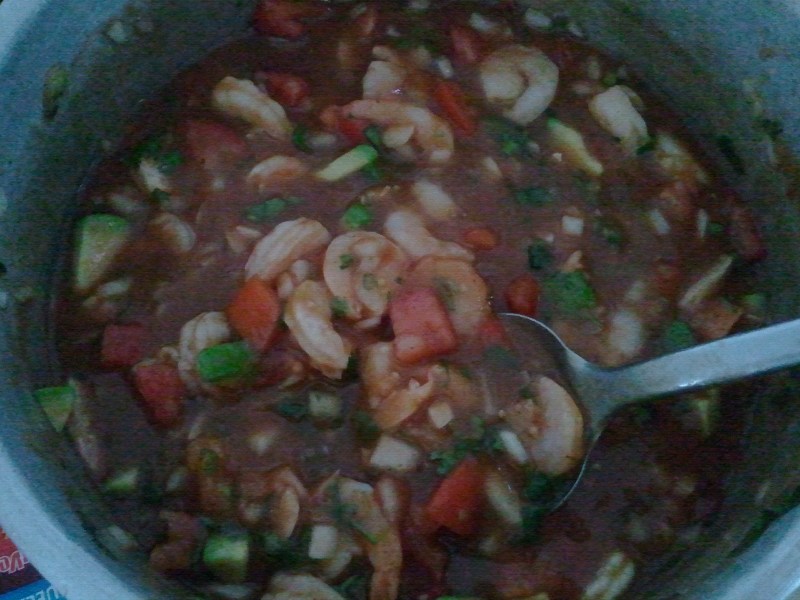
GoodnightKeep us postedI feel you im always hot I love the coldI took a bite of pizza and spit it outI took a bite of pizza and spit it outGo to the e.r you need fluidsI need to weed my garden to but it was so hot todayMy kids love it to it was awesomeThey are I hate those stupid stalls but you will have them and before you know it the scale will move againThe first two weeks after surgery are going to be hard your going to get push to your limits but just hold on it will get betterI hate that feelingThey had funI call its shrimp cocktailIts really good I love that stuffI sometimes eat a few but it is what it is like you said better then a whole bagI know this doesnt have anything to do with this site but my daughter has a youtube video nikki and elena[ATTACH]3823[/ATTACH] This is what I ate the other day



Account
Navigation
Search
Configure browser push notifications
Chrome (Android)
- Tap the lock icon next to the address bar.
- Tap Permissions → Notifications.
- Adjust your preference.
Chrome (Desktop)
- Click the padlock icon in the address bar.
- Select Site settings.
- Find Notifications and adjust your preference.
Safari (iOS 16.4+)
- Ensure the site is installed via Add to Home Screen.
- Open Settings App → Notifications.
- Find your app name and adjust your preference.
Safari (macOS)
- Go to Safari → Preferences.
- Click the Websites tab.
- Select Notifications in the sidebar.
- Find this website and adjust your preference.
Edge (Android)
- Tap the lock icon next to the address bar.
- Tap Permissions.
- Find Notifications and adjust your preference.
Edge (Desktop)
- Click the padlock icon in the address bar.
- Click Permissions for this site.
- Find Notifications and adjust your preference.
Firefox (Android)
- Go to Settings → Site permissions.
- Tap Notifications.
- Find this site in the list and adjust your preference.
Firefox (Desktop)
- Open Firefox Settings.
- Search for Notifications.
- Find this site in the list and adjust your preference.