longercurlz
Gastric Bypass Patients
-
Joined
-
Last visited
-
-
-
-
I had my surgery 13 years ago and the biggest disconnect I have noticed is the lack of support as it pertains to working out after gastric bypass. When I first had my surgery, I walked around my office during my breaks but didn't join a gym. The lack of this lifestyle change, and developing some bad eating habits resulted in a regain of 40 lbs during the first ten years. I finally managed to change my eating habits to vegetarian and started working out regularly. I joined the gym and have been a loyal gym rat ever since. I think the thing that kept me away was the insecurity of not knowing how to use the machines and thinking "everybody knows I had surgery!' I finally hired a trainer and she knew little, if anything, about gastric bypass and some of the limitations. She read up on the surgery and developed a workout routine to suit my needs. Since I joined this and another forum, I have received a lot of messages from local people who wanted to workout with me and I have met some of them at my gym and given them a workout. I have looked for trainers who offer workouts to gastric bypass patients and I cannot find anybody locally! So I'm wondering if any of my fellow gastric friends have received training from someone who focuses on the gastric/lap band community? I am thinking of getting my personal trainer certification and just focusing on this community!
-
-
-
-
-
LOVE Lake Geneva!!! I visited there for business last July and fell in love with the place! I'll trade ya!
-
-
Hi Michelle, Thanks for your note. Thirty-two pounds in two weeks is fantastic :-) I didn't go to the gym right away because, to be honest, I was intimidated because I thought everybody was looking at me. I wish I had because I would have had results faster. I started going to the gym about 4 years ago BUT I have always walked for exercise. I only took two weeks off after surgery and I immediately started walking, first a low grade walk around a cul-d-sac by my office and then moved up to the hills. I eventually hired a trainer and she taught me a workout that is the same one (with higher intensity) that I use today. I do know that you can do any workout that doesn't exceed the 5 lb max you should be lifting and you shouldn't do anything with your core right now, list sit ups or planks, anything that you feel in your core. If you can find someone local who goes to the gym and can help you with a routine, I would recommend it. The best investment I ever made was hiring that trainer. Good luck to you!! Betsie
-
-
-
-
-
-
A YEAR? Well as far as any strenuous workout (high intense cardio like turbo kick box or boot camp) or heavy weight training (you shouldn't lift more than 5 lbs for a year) a "workout" should include walking. I started walking two weeks after my surgery. I did something light (which was more than I had ever done...I mean, let's face it, we didn't get heavy because we were gym rats!).. I would walk briskly on my breaks and down this hill. The hill would kill me and I would have to stop a few times but I did it in 15 minutes. You should not do anything to affect your incision like sit ups or anything more than 5 lbs but you should, at the very least, walk. I didn't have any after care so I was on my own but it worked for me. I'm tone and fit now..most people don't even know I had the surgery. Good luck to you!!
-
I had my surgery in 2000. At that time, it was fairly new and my inspiration was Carne Wilson, believe it or not. My 13 year anniversary is April 28. I had no pre-op or post-op care but just studied and made sure I recognized that this was my rebirth and things needed to change. I did not want to take the surgery for granted. I did find myself (when I was in relationships) ignoring workouts and eating garbage. I DID gain 60 lbs back during the course of 8 years but in 2008, I wised up and started working out at the gym on top of my walking I had been doing every day at lunch. I also became a vegetarian because I needed that "whole" foods diet that would help me eliminate garbage. My advice is that you work out at least three times a week by walking (for starters), then go to the gym at least 30 mins/three times a week. If you're too soon out of post op, make sure you don't do much with your mid-section but don't ignore it either. The biggest neglects are the CORE. Too many people like us have surgery and then have a lot of loose skin on their belly...make sure you focus on that area. Do something that you will feel your core. As you advance, you can do the ab roller, or planks. I love looking at all of the progress on here! B
-
Have yourself a damn Ritz! Just don't eat the entire box like you used to (and I used to!) Have 3 and chew until you're bored with them. You can even spread a VERY thin layer of sugar free Peanut Butter..SUPER thin to add some pizazz! Congrats to you and your new journey...you will NOT have regrets. Betsie
-
Right now it will be very boring but please make sure (you sound like you are) you follow the rules. I have always eaten for fuel as opposed to for flavor or thrills. I also eat as whole as possible to avoid over-processed food. Some foods look good on the outside but check out those ingredients to make sure there isn't a bunch of unhealthy fillers. PS...I have had to realize that food is jut for fuel and not for fun anymore :-( Im happy for your new journey!!
-
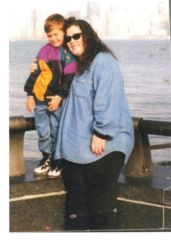
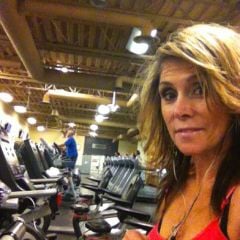
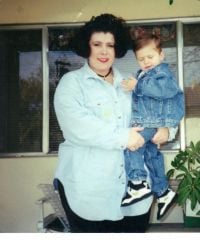
I had my surgery 13 years ago (anniv April 28) and for the past several years, I have worked out religiously. I hope all of you will gain inspiration from my pictures...and please ask questions!
-
Wow...I can't say enough about the person I was before as opposed to who I am now. I am a full vegetarian, work out every day, size 6, love life/love being active/ so thankful that this surgery was available when I needed it...2000 :-)
-
Hi Janec, In all honesty, my friends started eating JUNK instead of healthy Snacks. One of them I work with and she eats all, day long. Her "snacks" are Pasta, fried fish, chips, garbage like that. I have NEVER seen her walk or workout during the day ...not even a walk during her break. I feel terrible for her because everybody comes to me and says "Please talk to Regina...she has gained her weight back." I have to tell them that she KNOWS she's gained it back, I know she feels horrible about it and if she wanted to talk to me, she would. Basically I've learned that I need to snack throughout the day BUT I have lean, filling snacks...pretzels, small hand full of nuts, dried edamame, carrots, frozen grapes,Greek yogurt, all under 100 calories BUT filling. I eat for fuel...just remember that when you're eating or snacking..."Will this meal provide fuel or is it empty calories?" I bought those little, inexpensive books called "Eat this not that" ...there is a series of books that cover fast food, dining out, grocery shopping, sweets. I have had nightmares about how this is all a dream and I have never gone through the surgery and lost all of the weight! That kind of snaps me into shape...it's such a scary thought. I did this for me and my sons and also there is a tieensy little part of me that wanted to give everybody a bit "eff you" who said I was "taking the easy way out" "going to fail" "you'll gain it back." And you have to learn to love to workout in some capacity daily..even if it's a 15 minute , brisk walk! Ask anything :-) BetzI have never participated in a support group because my surgery was 12 years ago. In fact, the pre-op was simply him drawing what was supposed to be a stomach on a manila folder, circled a small portion and said "this will be the size of your stomach...are you ok with this?" I am here for anybody who has questions, etc....I've lived it and I'm a success story.Good luck everybody! And worm2872...you can stress eat all you want...just make sure it's healthy! You don't need to eat garbage...freeze some grapes, which is my favorite snack,Oh my gosh.. Sorry for all of the spelling errors in my response! I'm on my iPhone and can't see! Just to make a few corrections.... I meant to say gastric bypass seat and ca t be a frond we hang out with anymore!