/* BP FIX 2026-09-17 counter contrast: card is forced #24364e in any scheme, so text must stay light */
html[data-ips-theme="5"] body[data-pageapp="forums"] #ipsLayout__main #ipsLayout_sidebar .ipsWidget:has(>.cWeightCounter) .cWeightCounter{color:#f7f9fd}
html[data-ips-theme="5"] body[data-pageapp="forums"] #ipsLayout__main #ipsLayout_sidebar .ipsWidget:has(>.cWeightCounter) :is(.cWeightCounter__title,.cWeightCounter__lbs,.cWeightCounter__guest,.cWeightCounter__guest p){color:#f7f9fd!important}
html[data-ips-theme="5"] body[data-pageapp="forums"] #ipsLayout__main #ipsLayout_sidebar .ipsWidget:has(>.cWeightCounter) .cWeightCounterForm__label{color:#aebbd0!important}

busybeingme
Gastric Sleeve Patients
-
Joined
-
Last visited
Everything posted by busybeingme
-
Oops!! Min not moms.... Stupid auto correct
-
Just saying march 20 is :: 26 days 4 hours and 48 moms away till my 10:30 procedure time!!
-
Whoohooo!! Patrick! Great job! Looking good!
-
I've been looking I can't find it... Is it a group that you need a password to access?
-
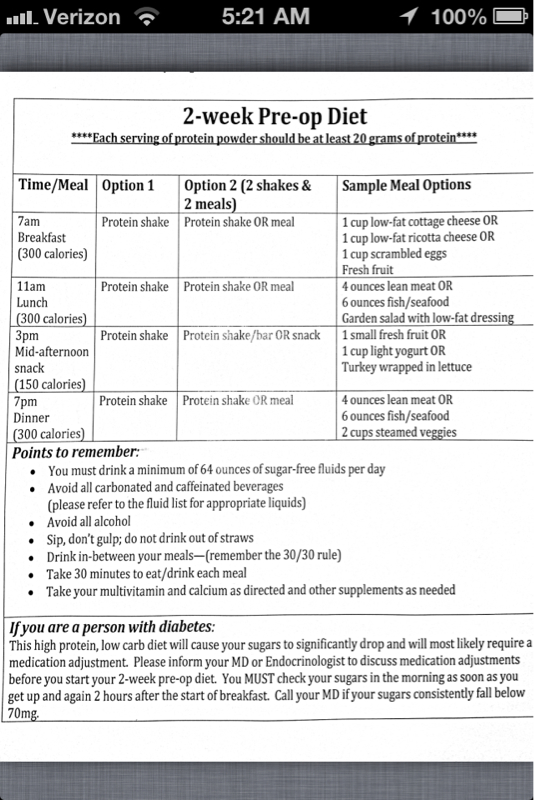
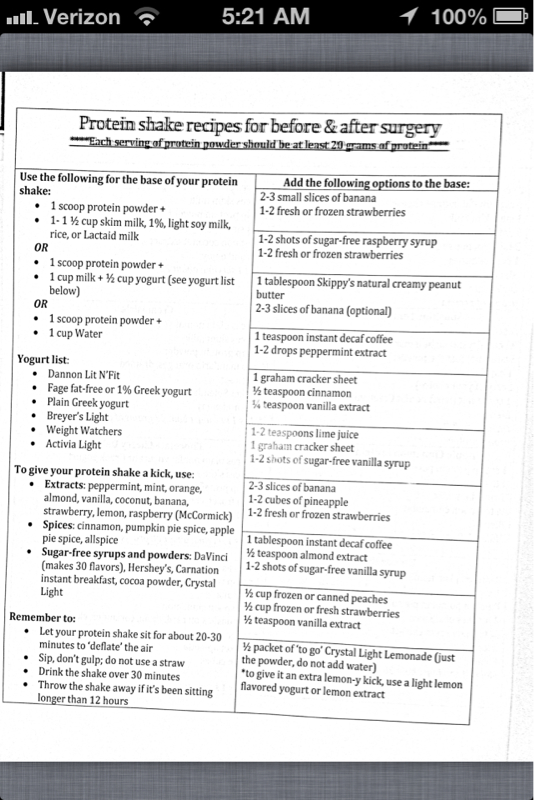
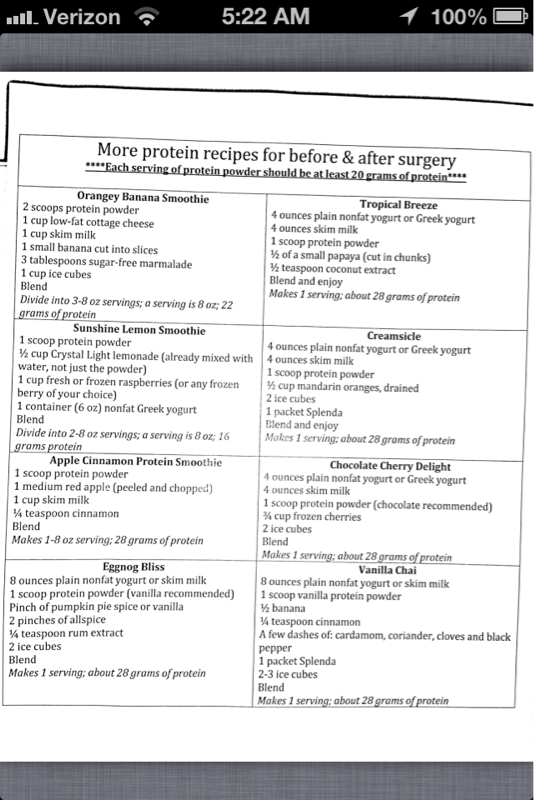
Here is a copy of my preop diet... I can deal. 4 weeks from today!!! So happy!!
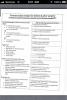
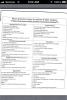 So... What do we think the name of the corporation is going to be??? A name combo or mark and Lexi since they died?Saggy HO-ha!! LMAFO! I love this thread!I see my doc and NUT tomorrow for my last reg appt before surgery... I'm approved and ready to go... I will get my preop diet tomorrow... I've already been eating small plates, no soda, no straws and lots of water already. I've lost 10 lbs... My surgery is on the 20th... So I'm supper excited!! My stats: 35 yo, 5'7" 320 lbs (330 to start) size 24 jeans 3x tops. My goal is 150. (No lower than 140) Nervous? A little. I'm so excited I don't think I have enough room for nerves.... I've told only my closest friends and family (some close coworkers). I will be off work exactly 3 weeks to the day if surgery.... Have been doing BOP (bariatric outpatient physical therapy) I am joining a gym in march... I will be able to go to the gym within days of surgery so I'm excited about that.... Biggest thing now is working on what to pack getting my house ready...Whoohooo!! I'm the 20th too!March 20 is only 35 days away...I had mine done on the feb1... It was fine and normal. The reason they do them is to verify that your anatomy is normal, you don't have any obvious ulcers, or issues from acid reflux. This way when your surgeon goes I for surgery there are no surprises.OMG! Well kids I always had my date from day one and I knew I would be approved but to hear it from my insurance company's mouth.... To hear the words.. "Your approved!!" I'm so happy!!! Whoohoo!!! March 20 is my sleeve date and I know that it's only 6 short weeks away... It feels like an eternity! I know that all this prep work is so with it! if you are waiting on approval or of you have just started the process... Hang in there.... This is one happy girl!That has been my biggest hurtle... No drinking during a meal and sipping... I do have the no straw thing down pat!! I got a tervis cup both 32 oz and 16 oz I take it everywhere .. Drinking leading to sip consistently through my day. I even take the cup into places to eat... (Not classy I know but that's a way of life!)I know! How do you have a hosp with NO ER!!
Account
Navigation
Search
Configure browser push notifications
Chrome (Android)
- Tap the lock icon next to the address bar.
- Tap Permissions → Notifications.
- Adjust your preference.
Chrome (Desktop)
- Click the padlock icon in the address bar.
- Select Site settings.
- Find Notifications and adjust your preference.
Safari (iOS 16.4+)
- Ensure the site is installed via Add to Home Screen.
- Open Settings App → Notifications.
- Find your app name and adjust your preference.
Safari (macOS)
- Go to Safari → Preferences.
- Click the Websites tab.
- Select Notifications in the sidebar.
- Find this website and adjust your preference.
Edge (Android)
- Tap the lock icon next to the address bar.
- Tap Permissions.
- Find Notifications and adjust your preference.
Edge (Desktop)
- Click the padlock icon in the address bar.
- Click Permissions for this site.
- Find Notifications and adjust your preference.
Firefox (Android)
- Go to Settings → Site permissions.
- Tap Notifications.
- Find this site in the list and adjust your preference.
Firefox (Desktop)
- Open Firefox Settings.
- Search for Notifications.
- Find this site in the list and adjust your preference.