graylola
Gastric Sleeve Patients
-
Joined
-
Last visited
-
-
-
-
-
-
-
-
-
-
-
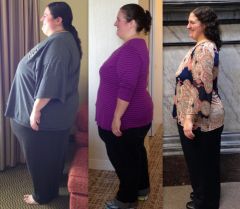
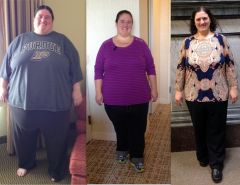
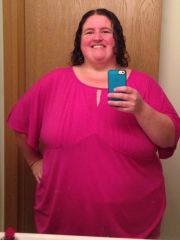
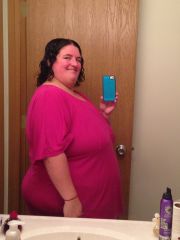
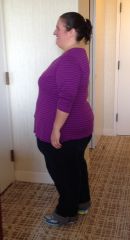
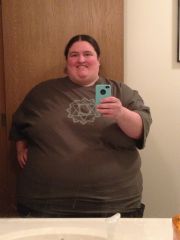
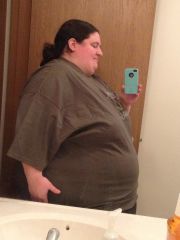
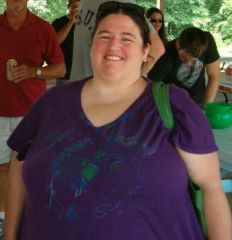
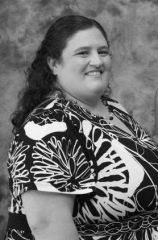
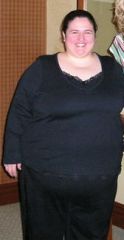
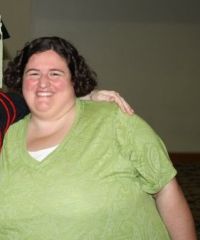
Day of surgery at 383 (?), down from a high weight of 410 a couple months before. 6 months and 1 year progress pic. Down from a size 40/5x to a 16-18/XL.
-
I picked up running a few months ago and when I told my NUT how many miles/hours I was logging in my week, she insisted I get at least 1000-1100 calories a day. I think when I made that adjustment and increased my carbs, not only did I lose like, 4 pounds that week, I wasn't battling a constant fatigue. Listen to your NUT and listen to your body and let the pounds fall where they may. If you're doing the right things you'll see the results one way or another.
-
-
-
Still here, still losing. Good job to you!
-
-
Here are my latest pictures. I was at I think 383 on the day of surgery (down from a high weight of 410 a couple of months prior to that - prior to surgery I started replacing as many meals as I could with Protein drinks). So 4/3/13, 6 months out and then yesterday, 1 year post op. I've lost 209 pounds. I am currently 201, so I'm excited to get below 200 for the first time probably since high school.
-
Progress, a weight loss surgery photo album by graylola on BariatricPal. 2 photos in Member Photo Gallery.
-
-
-
I was lucky enough that the surgeon was fine with my choice, actually encouraging of the sleeve given my age and how long I would have to deal with malabsorption issues with full bypass. I think the reasons they hesitate are if you have other issues like diabetes - which is resolved much more quickly/easily with the bypass, and if they're less experienced with the sleeve. I think there's a possibility you don't lose as much or as fast, but I don't know, that certainly hasn't been my experience.
-
-
I will be over a year post-op by the time I go. My surgeon's program does technically allow brown rice and whole wheat Pasta at this stage, but I'm choosing not to add any of that back into my diet if I can help it. The only grain I eat is quinoa. I have had some frozen veggie burgers that probably have rice product in them. I've used some bread crumbs or panko in recipes. But mostly no bread, no pasta. So I'm not really interested in adding any of that in, though I am fairly certain that I'm at a stage that it wouldn't really hurt me. I mean, I'm sure I could eat some gnocchi and not have any intestinal problems, if I needed the food just to not go hungry. But I would prefer not to. I'm going to be primarily in Milan and florence. I might pack a bit of Protein powder to supplement, just in case. But does anyone have any experience in the country and know how easy or hard it will be for me to find appropriate high protein options?
-
Wow, that is a drastic change! I'm lucky enough I've never had what I would consider a stall. Or if I have had one week here or there that's a little low, it's always followed up by a good week the next one. I don't know why that is, when I see so many people struggle with it, but I like to think it's because I constantly change up what I do. Some weeks I wouldn't feel the elliptical, but I did a dance dvd. I do some strength training when I'm on top of it. Or some weeks I'm a slug. My metabolism probably needs those time periods too . Every week I change my menu - if I've been having a lot of chicken, I'll try to throw in some ground beef, or pork or seafood. I hit my Protein and Water goals set by my surgeon every single day. I try not to worry about slow loss. 1 pound is 1 pound. As long as I keep being honest with myself and try to burn more than I eat, it'll keep heading in the right direction, I figure. I expect it to get harder on the other side of 200.
-
-
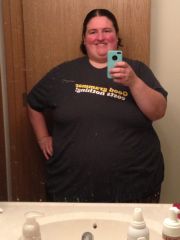
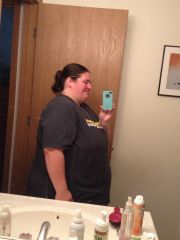
You're doing great!! I started at 409 and am down to 216. I'm so excited to be so close to 2 big goals - losing 200 total and getting under 200 for the first time in forever. I'm also training to run a half marathon in May, and I am happier than I could have imagined. Attached are photos from sometime last February or March, and ones from last week.
-
2006-2011
-
Don't know if anyone's still reading this board. I stumbled back onto it after browsing the site again. Sometime after my last post I really had the Eureka moment of realizing that the only thing keeping me from doing more strenuous activities was this mental voice that said "Oh, no, I can't do that" because my brain was stuck in my old body. I started going to an hour long high intensity aerobics dance class. I started doing weight machines in the gym. And since last fall, I've been running. I'm training to be in my first half marathon in May and I run 5 times a week in varying lengths. Last Saturday I ran 5 miles. Whatever you all ended up doing, I hope that you've gotten rid of any mental blocks and are as successful as you can be.
-
-
-
-
I avoid it as much as possible unless it's necessary. I had one of my toughest choices going to meet friends at a restaurant that only served pub food, where i just ate the insides of shrimp tacos to get a few pieces of shrimp and cabbage in. Sometimes it's really hard to find options that aren't stuffed with hidden calories - wings that are fried, meat that has sauces, salads that have just tons of random cheese and croutons. But if they have the option to add grilled chicken to a ceasar salad or something, then the waitstaff are pretty willing to give me just a chicken breast and some side veggies. Whenever possible, look at the menu's nutritional information online beforehand or ask the staff if they have a sheet available. After a lifetime of bad choices, you'll be surprised at the times that you think you're being "good" by picking something that turns out to have way more calories than you would ever eat at a normal meal at home, even if the components sound healthy.
-
And to maybe make you feel even better, my program didn't even have a pre-op diet. Just Clear liquids the day before. I attended a support group meeting that had one of the surgeons from our Center of Excellence speaking, and he said they don't believe that there's any use or truth to a liver-shrinking pre-op diet. They are able to do the surgery regardless, though of course it remains a possibility that they have to make adjustments as they go - perhaps doing a full cut as opposed to laproscopic, or making more holes than they originally planned.
-
My "bible" from St Vincent's says at 18 months I should be up to 8oz. 4 of protein and 4 of other (starch, veggie, fruit). "Allowed" makes it sound like someone's going to arrest you if you eat more. You're allowed to do whatever you want. You should be eating 8 ounces.
-
Congrats to everyone once again! Love the updates in this area of the board. I started out at 410, BMI of 75. I'm now 273 and BMI of 49! I am no "Super Morbidly Obese", only "Extremely Morbidly Obese". Haha. I'm looking forward to hitting 250 for the first time in like 10 years. Just bought my first pair of jeans in years, and just went shopping at an outlet as opposed to the specialty online stores. Happy happy happy!